


TikTok Ads for Events: How Promoters Sell More Tickets on TikTok
The complete guide to TikTok ads for ticket sales: Pixel and Events API, campaigns along the on-sale cycle, Spark Ads with artist content, music rights, a worked budget example and how to check TikTok's reported purchases against real ticket sales.


TikTok ads can sell tickets faster than almost any other channel when the creative feels like TikTok and the tracking is clean, and they can burn budget faster than any other channel when neither is true. The platform is built on discovery: people do not come to TikTok to buy a ticket, they come to be shown something. A 12-second clip of a crowd losing it at the drop, a comedian's best line, a backstage moment from last night's show: that is the moment a new buyer decides they want to be there.
This guide is the hub for selling tickets with TikTok advertising. It covers tracking with the TikTok Pixel and Events API, campaign structure along the on-sale cycle, audiences, Spark Ads and reach formats, music licensing, budgets with a worked example, and honest measurement. Where a topic deserves more depth, we link to our detailed guides, starting with the TikTok Ads Manager guide for first-time account setup.
Key takeaways
- TikTok ads sell tickets when the creative is native, vertical and shows the live experience in the first two seconds, not a poster with music.
- Send a deduplicated Purchase event with value through both the TikTok Pixel and the Events API, using the same event_id from browser and server.
- Plan campaigns along the on-sale cycle: reach at announce, lead forms for presale, Sales objective in the first 72 hours, retargeting and urgency at last call.
- Spark Ads with artist and creator content usually outperform brand-made videos, but only with sound and posting rights cleared before launch.
- Treat TikTok's reported purchases as a claim and reconcile them every week against verified sales in your ticketing system.
Why TikTok ads work for ticket sales, and where they do not
TikTok is a sound-on, full-screen, vertical feed driven by an algorithm that serves content based on what people watch, not who they follow. For promoters, that changes the job. On Meta you often find buyers through interests and lookalikes; on TikTok the creative itself does most of the targeting. A strong clip of a show finds its audience. A weak one is skipped in under a second, however precise your settings are.
That makes TikTok advertising particularly strong for three things in live entertainment: creating demand for shows people do not know yet, reactivating fans who forgot an act was touring, and pushing urgency in the final weeks when real crowd footage from earlier dates exists.
Event types that fit best
- Concerts and tours with an artist who already posts on TikTok, or whose songs are used in TikTok videos. The artist's own content is your best ad.
- Festivals and club events, where the atmosphere is the product and crowd footage, line-up reveals and countdowns translate directly into vertical video.
- Comedy, because a short bit is a free sample of the show.
- Visual shows and immersive experiences: touring productions, exhibitions, family shows and theatrical spectacles that look surprising on a phone screen.
- Multi-date runs where you can film one night and use the footage to sell the following weeks.
Honest limits
- In-session purchase intent is low. People rarely complete a 4-step ticket checkout on the first view. Plan for retargeting and for people who buy later on another device.
- The audience is broad today, but the core still skews younger than Facebook. Classical concerts or shows for an older audience can work, though usually at a higher cost per ticket.
- In the EU and EEA, TikTok does not show personalised ads to users under 18. If your audience is mostly teenagers, expect reach but not precise targeting.
- If your ticket shop sits on a third-party domain where you cannot install the Pixel, optimisation gets harder (see the next section).
- Creative wears out fast. A clip that worked last week can fatigue within days at high spend, so you need a production plan, not a single asset.
Account and tracking setup for TikTok advertising
Most failing TikTok campaigns for events are tracking problems in disguise. If the algorithm never sees a reliable purchase signal, it optimises for cheap clicks from people who will never buy. Fix this before announce day.
Business Center, ad account and identity
- Create a TikTok Business Center you own and keep the ad account, the Pixel and the linked TikTok accounts inside it. Give artists, venues and co-promoters partner access instead of sharing logins.
- Link the TikTok account that should appear as the ad identity (your venue, festival or promoter brand). For artist-led campaigns you will mostly run Spark Ads from the artist's account, which requires authorisation (more below).
- Set the ad account currency and time zone to match your ticketing reporting. Changing them later means a new ad account.
TikTok Pixel plus Events API
The browser Pixel loses events to ad blockers, browser privacy features and declined consent. The Events API sends the same events from your server or your ticketing provider's server. Run both. Step-by-step installation is in our guide to installing the TikTok Pixel and setting up event tracking.
- ViewContent on each event page, with a content_id per show or per date.
- AddToCart when tickets are selected, InitiateCheckout when checkout starts, AddPaymentInfo where your shop exposes that step.
- Purchase on the confirmation page with value, currency and number of tickets. TikTok renamed CompletePayment to Purchase in 2025; older setups still work, but new implementations should use Purchase.
- Lead (formerly SubmitForm) for presale registrations and waitlists.
Deduplication
When Pixel and Events API both report the same purchase, TikTok needs the same event name and the same event_id from both sources to count it once. According to TikTok's documentation on event deduplication, duplicates between Pixel and Events API are merged within a 48-hour window. Use the order number as event_id: it is unique, it exists on both sides, and it lets you match platform data to ticketing data later.
When the ticket shop is on a third-party domain
Many promoters sell through a ticketing company's checkout. You have four options, in order of preference:
- Native integration: many ticketing systems let you enter a TikTok Pixel ID per event, and some also send server-side events. Ask your ticketer exactly which events fire, whether value is passed, and whether they send an event_id.
- Server-side from ticketing data: if your ticketer offers webhooks or an order API, send Purchase events to the Events API yourself, with hashed email or phone where consent allows.
- Your own event page as a pre-step: host the event page on your domain with full Pixel tracking and pass UTMs into the ticket link. You lose on-platform purchase optimisation, but you can optimise for a high-intent proxy such as a click on "Buy tickets".
- Offline upload: upload confirmed orders afterwards as offline events for measurement, even if they arrive too late for real-time optimisation.
UTMs and naming
Tag every ad link with UTMs so that your ticketing analytics can see TikTok as a source independently of TikTok's own reporting. A simple pattern: utm_source=tiktok, utm_medium=paid_social, utm_campaign=[show]_[city]_[phase], utm_content=[creative-id]. Ads Manager supports dynamic URL parameters, so you can fill campaign and ad names automatically.
Consent and GDPR
In Europe, the Pixel and Advanced Matching (hashed email and phone) need valid consent from your consent management platform. Fire the Pixel only after consent, and send server-side events only within the legal basis your privacy policy and data processing agreement cover. Talk to your data protection officer before you switch on server-side matching. A missing consent banner is not a tracking shortcut, it is a legal risk.
Campaign structure for TikTok ads along the on-sale cycle
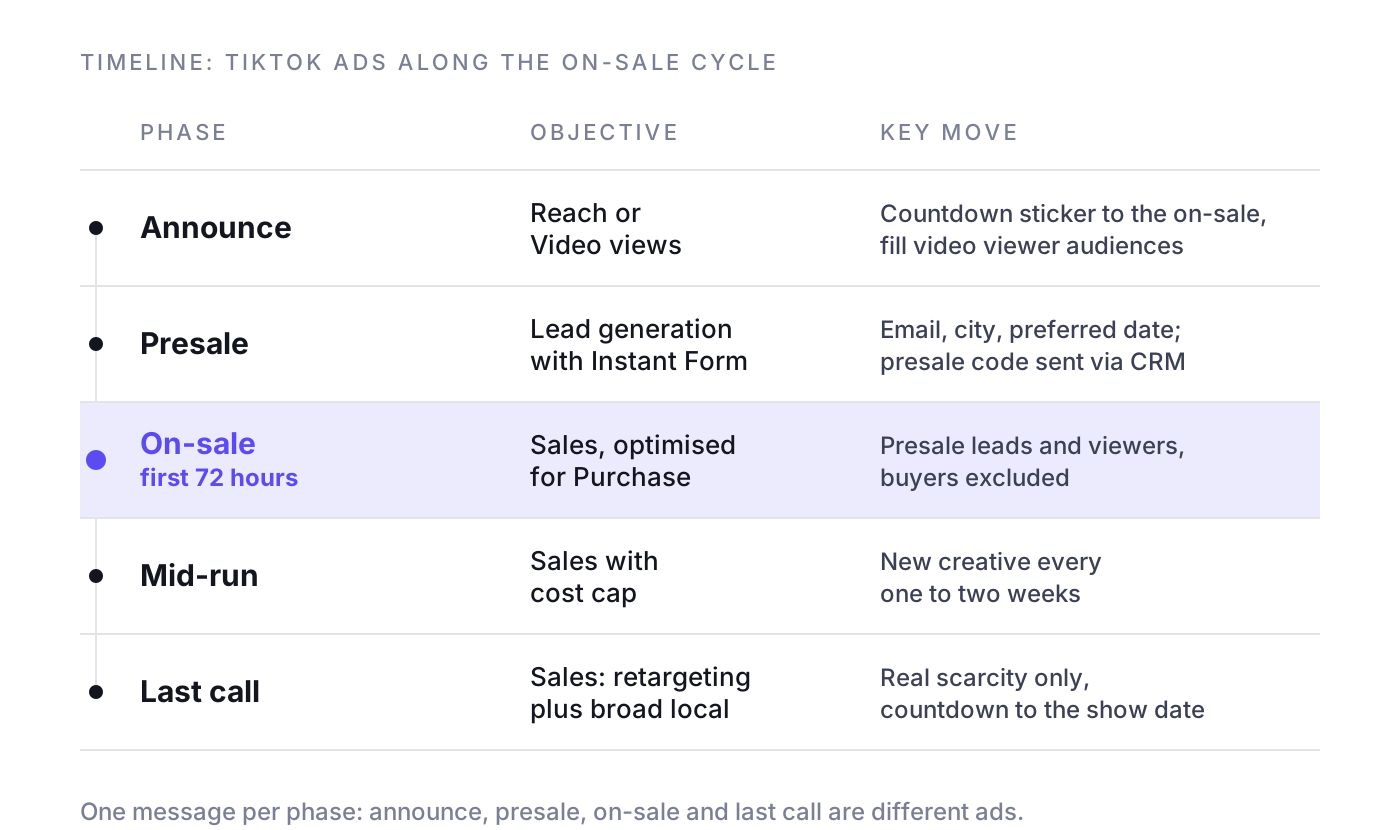
A show is not a shopping cart. Demand moves in phases, and each phase needs a different objective, audience and creative. Here is how to map TikTok's campaign types to the cycle. If you also run Meta and Google, align the phases with our Meta ads for events and Google Ads for events guides so the channels do not compete for the same buyer.
Announce: build reach and memory
- Objective: Reach or Video views for most shows. For major tours or festivals, reservation formats such as TopView, Top Feed or TopReach (see the formats section).
- Creative: the artist announcing the tour in their own words, a line-up reveal, a clip of last year's crowd.
- Add-on: a countdown sticker that lets viewers add the on-sale date to their calendar. TikTok's guide to the countdown sticker lists the supported objectives.
- Goal: fill your engagement audiences (video viewers, profile visitors) so you can retarget them at on-sale.
Presale: collect sign-ups
- Objective: Lead generation with an Instant Form, so fans can register for the presale without leaving the app. Alternatively, Traffic or Sales with Lead as optimisation event to a registration page on your domain.
- Form: ask for email, city and preferred date. Every extra field costs sign-ups. Connect the form to your CRM or email tool so the presale code goes out automatically.
- Audiences: broad plus announce-phase video viewers and profile engagers.
General on-sale: the first 72 hours
The first three days of an on-sale decide how much paid support the rest of the run needs. Our article on the on-sale curve and the first 72 hours goes deeper.
- Objective: Sales, optimised for Purchase with value.
- Audiences: presale registrants who did not buy, 6-second video viewers from announce, profile engagers, plus a broad prospecting ad group.
- Creative: "Tickets on sale now" in the first second, date and city on screen, the reason to buy now (best seats, first price tier, limited capacity, if true).
- Exclusions: buyers, uploaded as a customer file or synced from your ticketing system as often as you can.
Mid-run: efficiency and new angles
- Lower budgets, broader targeting, fresh creative every one to two weeks.
- Use social proof: reactions from fans who already bought, creator content, interviews, behind-the-scenes footage.
- Shift budget toward dates and cities that are behind their forecast, not toward the ones that already sell themselves.
Last call: urgency without lying
- Sales objective, retargeting of everyone who viewed the event page or watched most of a video in the last 30 days, plus broad local targeting around the venue.
- Creative with real scarcity: "last 200 tickets", "final show added", "doors at 7 pm tonight". Only if it is true. Fake urgency gets reported, and it damages the brand of the next show.
- Countdown sticker to the show date, not to the on-sale date.
Multi-date runs and tours
- One campaign per tour, one ad group per city or per date cluster, so you can move budget where it is needed. For long runs, read why mid-week dates eat your margin.
- Use city in the ad text and on screen. "Hamburg, 14 March" beats "European tour 2027".
- Film the first dates and feed the footage into the ads for later cities within days. On TikTok, recency is a creative advantage.
Smart+ or manual campaigns?
Smart+ is TikTok's AI-driven campaign type. In the upgraded Smart+ experience, manual and automated setups sit in one creation flow, covering Sales, Lead generation, App promotion and Traffic. Automated campaigns share one budget and optimisation goal across ad groups, while manual ones let you set targeting, placements and bids per ad group (see TikTok's guide to creating campaigns in the upgraded Smart+ experience; availability varies by account). A practical rule for events: use automated Smart+ for broad prospecting once your Purchase event is reliable and you have at least five or six creatives, and keep manual ad groups for retargeting, presale lists and buyer exclusions, where you need control.
Example campaign names
- TT_ArtistX_Tour27_Announce_Reach
- TT_ArtistX_Tour27_Presale_LeadGen_InstantForm
- TT_ArtistX_Tour27_Onsale_Sales_Purchase_Hamburg
- TT_ArtistX_Tour27_LastCall_Sales_Retarget30d_Berlin
Targeting and audiences on TikTok
On TikTok, creative does more targeting than settings do. Still, your audience setup decides whom you pay to reach twice and whom you never stop paying for.
First-party data and lookalikes
- Customer files: upload past buyers (hashed email and phone, with consent) for exclusion and as a seed for lookalike audiences. Segment by genre or venue, because buyers of a jazz night are a poor seed for a techno festival.
- Lookalike audiences: build them from buyers of comparable shows. Start narrow (closest match) for on-sale, broaden for mid-run.
- Exclusions: exclude buyers of the specific show in every sales campaign. Refresh the list at least weekly during on-sale.
Engagement audiences and retargeting windows
- Video viewers: 6-second viewers or 75 percent completion for warm audiences, 2-second viewers only for very short campaigns.
- Profile engagers: people who followed, liked or visited the artist or venue profile.
- Website visitors: event page visitors in the last 7 days (on-sale), 30 days (mid-run), 60 to 90 days (last call), excluding purchasers.
- Lead form openers who did not submit, for presale reminders.
- If a sell-out creates a waiting room, read our article on retargeting queue traffic before you spend money chasing people who were already in line.
Interest, behaviour and broad targeting
TikTok offers interests plus behaviour targeting based on which videos, hashtags and creators people interact with. For events, that means "watched videos about techno" or "interacted with creators in comedy". Use these for a test ad group, but expect broad targeting with strong creative to win more often once the Purchase event has enough volume. Add location targeting by travel radius around the venue, typically wider for festivals and arena shows, narrower for club nights.
Example audience definitions
- Warm on-sale: presale leads plus 6-second viewers of announce videos (last 30 days), excluding buyers.
- Lookalike prospecting: lookalike of buyers of the last two tours in the same genre, country, 18+, excluding buyers.
- Broad local: 18 to 54, 80 km around the venue, no interests, excluding buyers and current leads.
- Last call: event page visitors last 60 days plus 75 percent viewers last 30 days, excluding buyers.
Search ads on TikTok
People search on TikTok for artists, "festival outfits", "things to do this weekend" and city names. TikTok offers Automatic Search Placement (formerly the Search Ads Toggle), which extends eligible ads to search results, and a dedicated Search Ads Campaign with keyword targeting. At the time of writing, the keyword-based campaign is available in the US and UK and in testing elsewhere. Use the artist name, tour name and venue as keywords and add negatives for unrelated meanings. Search volume on TikTok for a specific show is smaller than on Google, so think of search as a top-up, not a pillar.
What to stop doing
- Stacking ten interests into one ad group and calling it targeting.
- Splitting the budget into so many ad groups that none of them gets enough conversions to exit learning.
- Running sales campaigns without buyer exclusions.
- Targeting the whole country for a club show.
- Optimising for clicks or landing page views when a Purchase event is available.
Creatives and formats for TikTok ads that sell tickets
Creative is where TikTok campaigns are won or lost. For broader principles across channels, see creative for live entertainment. For every placement and size, see our overview of TikTok ads formats and sizes and of TikTok ads placements.
TikTok ad specs for In-Feed video
- Aspect ratio 9:16 vertical, at least 540 x 960 px; produce at 1080 x 1920 px. 1:1 and 16:9 are accepted but waste the screen.
- Length: up to 10 minutes are possible, but for event ads 9 to 30 seconds is a sensible rule of thumb. Put the hook in the first two seconds.
- File types MP4, MOV, MPEG, 3GP or AVI, up to 500 MB.
- Ad text appears over the video and does not support clickable links, @ mentions or hashtags. Keep the key line short.
- Keep text and logos out of the bottom and right edges, where the caption, CTA button and icons cover the video. TikTok's safe zone templates show the exact area.
Spark Ads with artist and creator content
Spark Ads promote organic posts from a TikTok account, the artist's, a creator's or your own. They keep the original handle, likes and comments, and engagement flows back to the post. For events this is usually the strongest format, because fans trust the artist's voice more than a promoter's. How it works:
- The account owner generates an authorisation code for a specific video in the TikTok app (video settings, ad settings, generate), or links the account to your Business Center for ongoing access.
- Agree the authorisation period in writing with the artist's management: it should cover the whole run, plus last call.
- Once a post is authorised as an ad, its caption cannot be edited. Fix typos and add the date before generating the code.
- A private video becomes public when it is used in a campaign. Do not authorise unreleased material by accident.
- Spark Ads with the artist's handle often get comments like "is there a Berlin date?" Someone must answer them, ideally from the artist's account.
Creator Marketplace is now TikTok One
TikTok's Creator Marketplace was replaced by TikTok One in 2025. TikTok One is where brands find creators, brief them, manage collaborations and access creative tools. For events, local creators work well: a city lifestyle creator going to your show, a comedy creator reacting to a stand-up clip, a festival creator packing for the weekend. Brief the facts (date, city, ticket link, what must be said), and leave the format to the creator. Then run the best posts as Spark Ads.
Reach formats: TopView, Top Feed and TopReach
- TopView is the first ad people see when they open the app. It is bought in advance as a reservation and suits big tour announcements or festival line-up drops.
- Top Feed is the first ad slot in the For You feed, again on reservation.
- TopReach, introduced in 2026, combines TopView and Top Feed in one reservation.
- Reach and Frequency campaigns let you plan reach and cap frequency at a fixed price.
These formats build awareness, not direct sales. They make sense when you have a large national audience to reach on a single day. For a 2,000-capacity club show, the budget almost always sells more tickets in auction campaigns.
Interactive add-ons and Branded Effects
- Countdown sticker: to the on-sale or the show, with a calendar reminder.
- Display cards and other add-ons: an overlay with price, date or line-up appears during playback. Use them to show the facts the video does not say.
- Branded Effects: AR effects users can apply to their own videos, for example a festival face paint or a stage filter. They are a fan engagement tool for large brands and festivals, not a ticket sales tool for a single show.
Sound and music licensing for ads
This is where event campaigns most often get stuck. Music on TikTok is licensed for personal, non-commercial use. A business ad may only use music cleared for it.
- TikTok's Commercial Music Library contains pre-cleared tracks for ads and business accounts. Use it for generic event or venue content.
- The artist's own track in a promoter ad requires clearance from the rights holders (label for the recording, publisher for the composition), even if the artist personally agrees. Get it in writing, specifying the territory, period and channels.
- Spark Ads of the artist's own posts are usually the easiest path, but check before launch whether the post's sound can be used in an ad. Trending sounds from other users in your own ads are not cleared.
- Live recordings from your show also contain the composition. Rights for paid use must be clarified like any other music use.
Creative production rules for live events
- Show the live moment in the first two seconds: crowd, stage, light, drop, punchline. No logo intro.
- Date, city and venue on screen within the first five seconds and again at the end.
- Film vertically and for sound-on, but add subtitles because many people still watch muted.
- Faces beat wide shots. A fan's reaction sells more than a drone shot of the arena.
- Produce in batches: three to five hooks per concept, each a separate ad. Replace losers weekly.
- Native beats polished. Phone footage from the artist or a creator usually outperforms a trailer cut for YouTube.
- One message per video. Announce, presale, on-sale and last call are different ads.
Example ad texts
- Announce: "Artist X is coming back. Hamburg, 14 March. Presale on Thursday: sign up now."
- Presale: "Get your presale code before everyone else. Takes 10 seconds."
- On-sale: "Tickets are live. First price tier until Sunday."
- Mid-run: "This was Munich last night. Hamburg is next."
- Last call: "Final 150 tickets for Friday. Doors at 7 pm."
Budget and bidding: what TikTok ads cost for an event
There is no fixed price for TikTok ads. You pay in an auction, and cost per ticket depends on creative, audience, season, competition and how much demand the show already has. What is fixed are the minimums: according to TikTok's budget documentation, a campaign daily budget must exceed 50 USD and an ad group daily budget must exceed 20 USD (or the equivalent in your account currency). Plan the number of ad groups with these minimums in mind.
Bidding
- Maximum delivery (lowest cost): the default. Good for on-sale, where volume matters more than a specific cost.
- Cost cap: set a target cost per purchase. Useful mid-run, when you know what a ticket may cost you. Too low a cap and the campaign stops spending.
- Value-based optimisation: optimises toward higher order values, if your Purchase event sends reliable values. Interesting for VIP packages and premium tiers.
- Change budgets in steps (rule of thumb: no more than 20 to 30 percent per day) so ad groups do not restart learning.
Worked example: a 2,000-capacity show
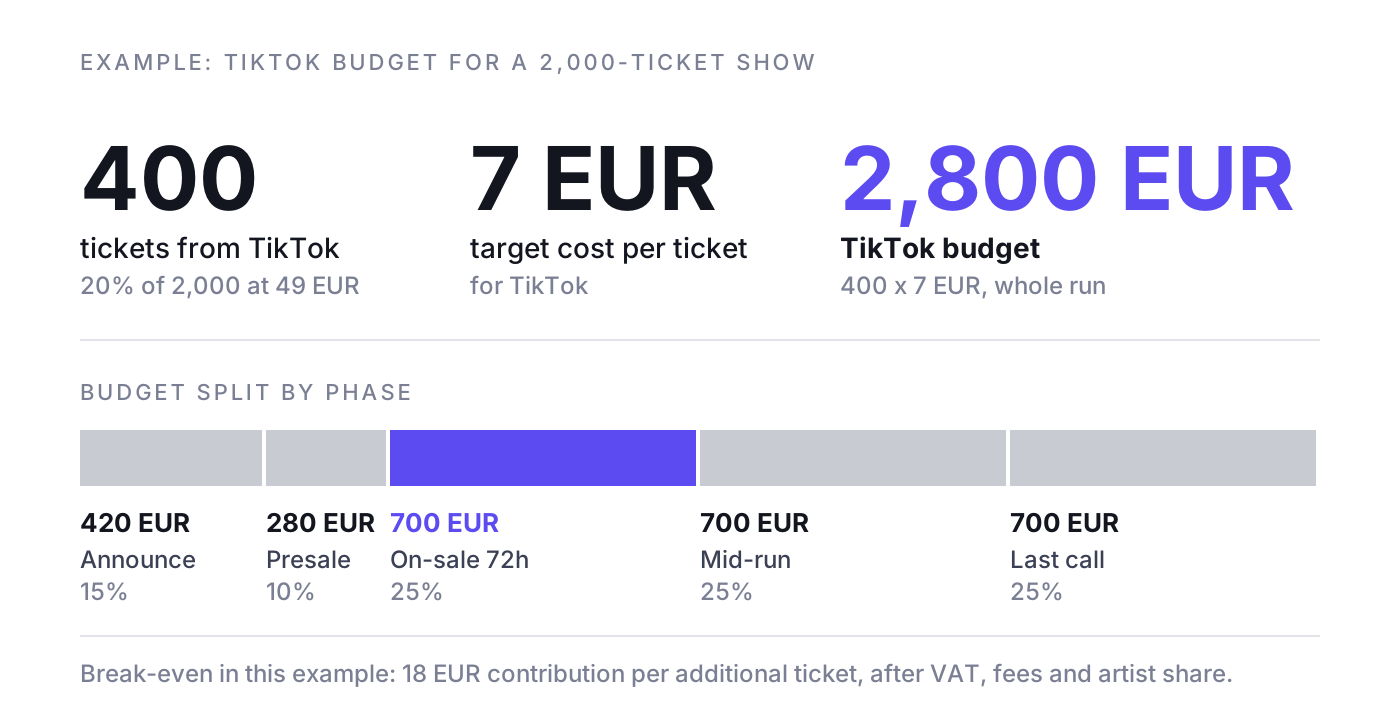
Example: a show with 2,000 tickets at 49 EUR. From earlier shows you expect TikTok to deliver about 20 percent of sales, so 400 tickets. Your target cost per ticket for TikTok is 7 EUR.
- Budget: 400 tickets x 7 EUR = 2,800 EUR for TikTok over the whole run.
- Announce (15 percent): 420 EUR, reach and video views, fill engagement audiences.
- Presale (10 percent): 280 EUR, lead generation with Instant Form.
- On-sale, first 72 hours (25 percent): 700 EUR, Sales objective, warm audiences plus broad.
- Mid-run (25 percent): 700 EUR, cost cap, new creative every one to two weeks.
- Last call (25 percent): 700 EUR, retargeting plus broad local.
Break-even logic
Example: the ticket costs 49 EUR, but after VAT, ticketing fees and the artist's share, perhaps 18 EUR of contribution remains per additional ticket. Then 18 EUR is your break-even cost per ticket. Below it, each additional ticket earns money; above it, you are buying sales at a loss. Two warnings: first, not every ticket TikTok reports is additional (some people would have bought anyway). Second, the last tickets of a nearly sold-out show cost more than the first ones. Our article on marginal cost per incremental ticket shows how to calculate this honestly.
Measurement: TikTok conversions are not ticket sales
TikTok reports purchases that it attributes to ads, based on clicks and views within its attribution windows. Meta and Google do the same. Add up all platforms and you often get more "purchases" than tickets sold. The truth is in your ticketing system.
Reconcile weekly
- Compare TikTok-reported purchases and revenue with verified sales from the ticketing system for the same period and the same shows.
- Check the attribution settings (click-through and view-through windows) and report click-based conversions separately. View-through conversions on TikTok are a soft signal.
- Use UTM data from the ticketing system as a second view: how many orders came with utm_source=tiktok?
- Watch the sales curve: when TikTok spend goes up, do total sales go up, or only TikTok's reported share?
Incrementality and holdout tests
The only honest answer to "how many tickets did TikTok really sell?" is a test. With tours this is easier than in e-commerce: switch TikTok off in two comparable cities for two weeks, keep everything else the same, and compare the sales curves with the cities where TikTok runs. Our guides on incrementality testing for ticket sales and attribution for live events explain the setup.
Common mistakes and a launch checklist
Common mistakes
- Running a poster with music as a video. That is a banner, not a TikTok.
- Launching on-sale campaigns without a working Purchase event, or with Pixel and Events API counting each order twice.
- Using trending sounds in non-Spark ads without a licence.
- Asking the artist for Spark codes the night before on-sale.
- Switching campaigns off after three days because cost per ticket looked high, before the learning phase is complete.
- No buyer exclusions, so fans keep seeing "buy tickets" after they bought.
- Reporting TikTok's attributed revenue to the artist as fact.
Launch checklist
- Business Center set up, ad account currency and time zone correct, admins with two-factor authentication.
- Pixel and Events API live, Purchase with value and currency, event_id deduplication tested with a test order.
- Consent banner fires the Pixel only after consent.
- UTM template in all ad links, visible in the ticketing system.
- Buyer list or sync for exclusions ready.
- Spark Ad codes from the artist and creators, authorisation period covers the whole run.
- Music rights cleared in writing for every track in paid ads.
- At least three to five creatives per phase, with date and city on screen.
- Budget plan per phase that respects the ad group minimums.
- Weekly reconciliation with ticketing data scheduled before launch.
Case study: Blue Man Group and Live Nation on TikTok
Together with Live Nation and Blue Man Group, NYBA delivered the first official TikTok case study in live entertainment. The campaign won the TikTok Ad Awards 2023 in the category Best Performance and generated more than 20 million impressions. In TikTok's own reporting, it reached a 130x ROAS and a 1.34% click-through rate.
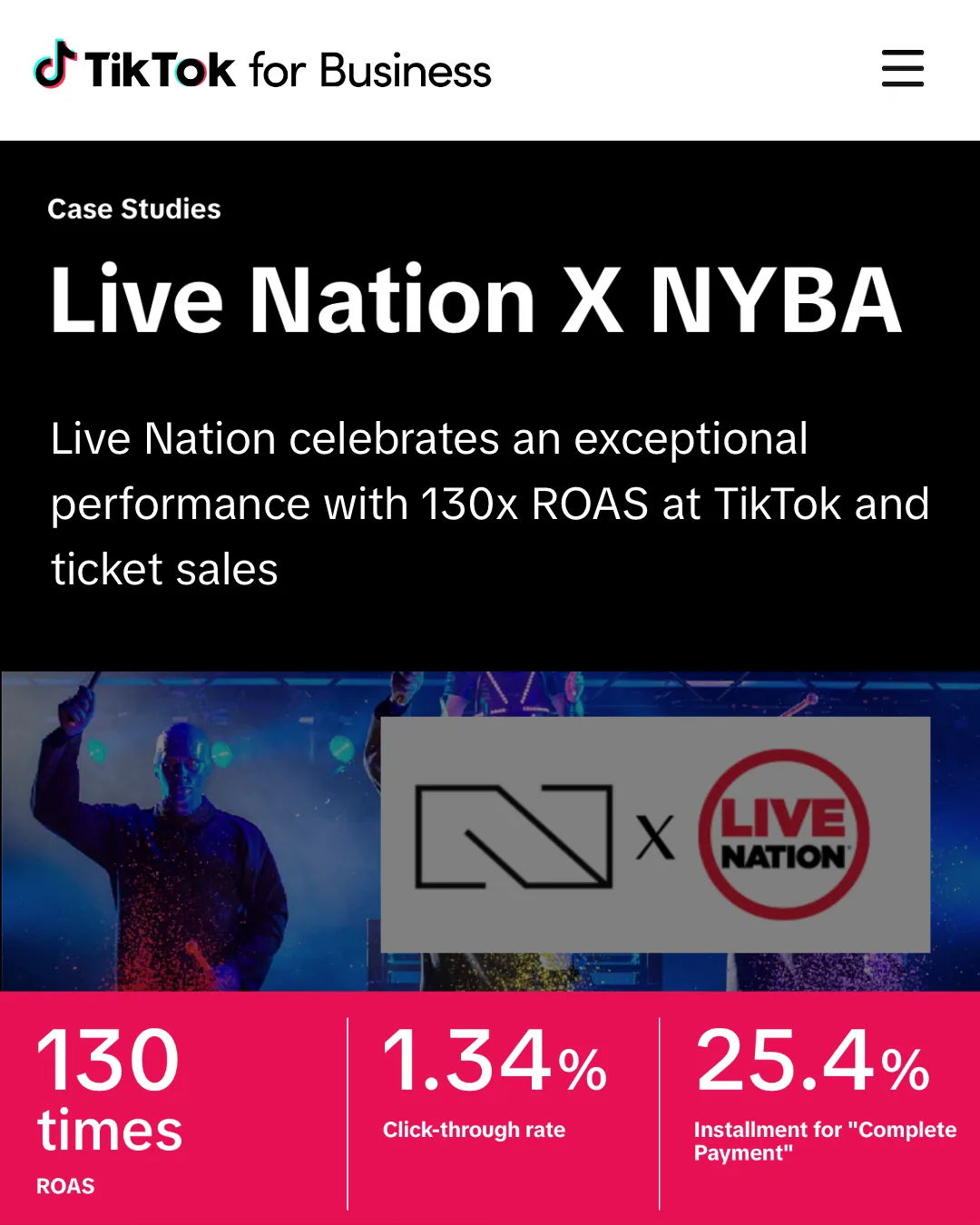
TikTok also features NYBA in its own success stories, under the headline “Turning Clicks into Sold-Out Shows: How NYBA became the leading marketing company for Live Entertainment”.

For promoters, the lesson is less the award than the type of show: a visual production that surprises on a phone screen is exactly the kind of event this guide describes as a strong fit for TikTok. And as this guide explains, a platform ROAS like this is a signal to verify against ticketing data, not a replacement for it.
Where NYBA fits
Everything in this guide can be done by hand. The work grows with every show, city and channel: forecasts, budget shifts, creative rotation and the weekly reconciliation with ticketing data. NYBA is the Revenue OS for live entertainment. NYBA OS forecasts ticket demand per show, runs campaigns on TikTok, Meta, Google and other paid channels, shifts budget toward the shows that need it and measures everything against verified ticket sales from the ticketing system, not platform-reported purchases. The NYBA expert layer sits on top of the platform.
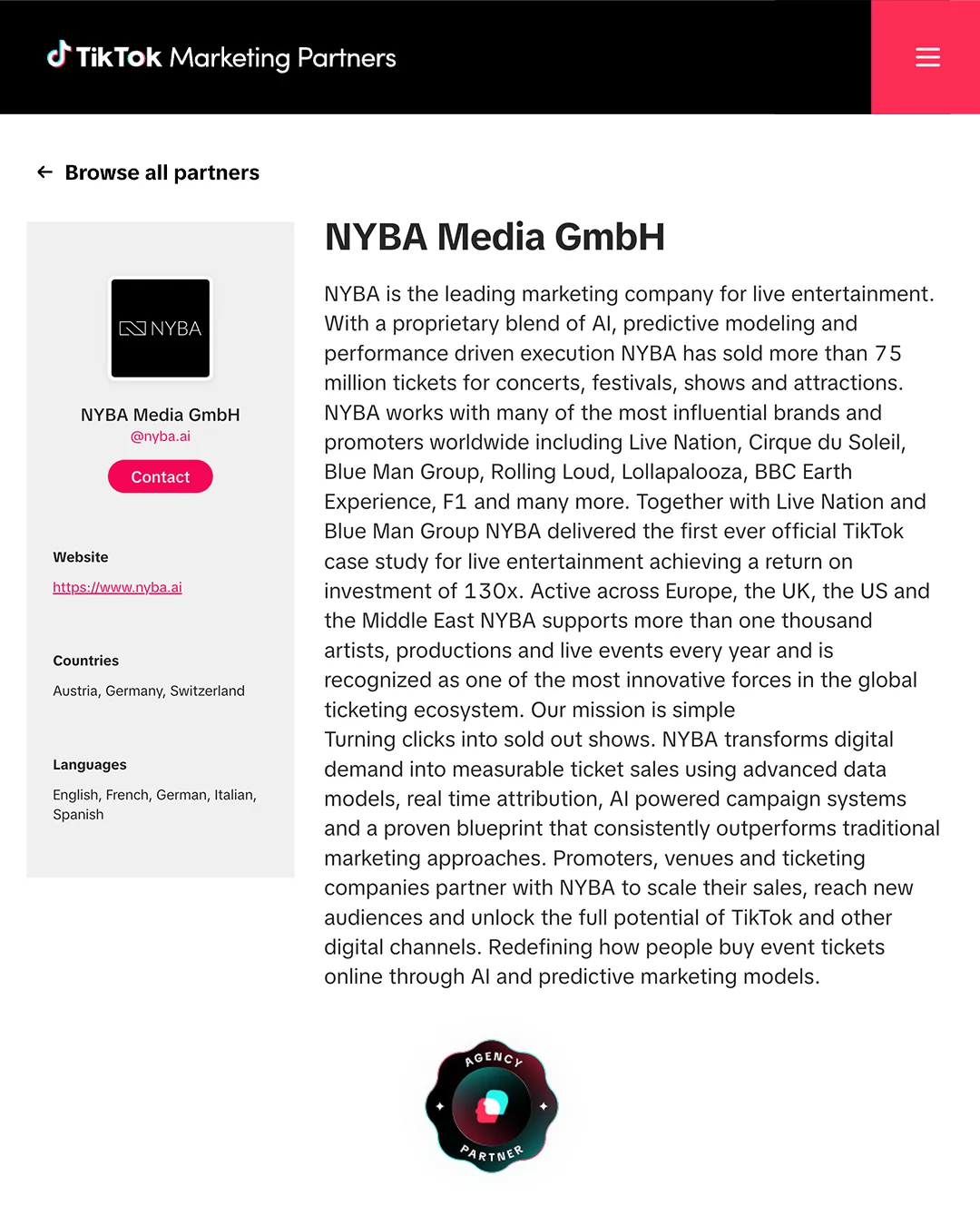
On TikTok specifically, NYBA is a TikTok Marketing Partner with Premier status for 2026 and is listed in the official TikTok Marketing Partners directory. Across the platform: 75M+ tickets, 1,200+ events per year and 100+ promoters, with clients including Live Nation, Cirque du Soleil and BBC Earth.
Frequently asked questions about TikTok ads for events
How much do TikTok ads cost for an event?
There is no fixed price; you pay in an auction. TikTok requires a campaign daily budget above 50 USD and above 20 USD per ad group. For planning, work backwards from the tickets TikTok should deliver and your target cost per ticket, as in the example above.
How do I run ads on TikTok for a concert?
Set up a Business Center and ad account, install the Pixel and Events API with a Purchase event, then create a Sales campaign in TikTok Ads Manager with Spark Ads from the artist's posts, warm audiences and buyer exclusions.
What are Spark Ads on TikTok?
Spark Ads promote existing organic posts, such as the artist's or a creator's, with their original handle and engagement. The account owner authorises the post with a code or by linking the account to your Business Center.
Do TikTok ads work for selling tickets?
Yes, for shows with strong visual or musical moments and native creative, especially at announce, on-sale and last call. They work poorly with poster-style videos, without a reliable Purchase event, or when sales are measured only in TikTok's reporting.
Can I use popular songs in TikTok ads?
Only if they are cleared for commercial use. Use the Commercial Music Library, or get written clearance from the label and publisher. Spark Ads of the artist's own posts are often the easiest route, but check the sound first.
What makes a good TikTok ad for a live event?
A live moment in the first two seconds, date and city on screen, one clear message, sound plus subtitles, and a native look. Several hooks per concept, replaced weekly.
Can I collect presale sign-ups on TikTok?
Yes. Use the Lead generation objective with an Instant Form that asks for email, city and preferred date, and connect it to your CRM so the presale code goes out automatically.
Can I track ticket sales if my ticket shop is on a third-party domain?
Often yes: through your ticketer's TikTok integration, through server-side events from ticketing data, or through offline uploads. If none of these works, optimise for a high-intent step on your own event page and measure sales via UTMs.
Want to see what TikTok really contributes to your ticket sales, measured against your ticketing data? Book a demo. One event, clean numbers, then you decide.
Related reading: Concert marketing playbook, Festival marketing strategy, Tour marketing, Ticket sales KPIs

Was würde 3x mehr
Umsatz für dich bedeuten?
Finde es heraus:
