


Google Ads for Events: The Complete Guide to Selling Tickets with Search, Performance Max and YouTube
A complete guide to Google Ads for promoters: brand, artist and generic keywords, Performance Max without brand cannibalisation, Demand Gen and YouTube, consent mode v2 and ticketing conversions, with keyword lists for a concert, a festival and a musical.


Google Ads for events works differently from social advertising. On Meta or TikTok you interrupt people who were not thinking about your show. On Google Search, a large share of buyers are already typing the artist, the festival or "musical tickets London" into a search box, and your job is to be the first useful answer with the right date and a working ticket link. Around that core sit Performance Max, Demand Gen, YouTube and the Display Network, which create demand rather than harvest it. This guide covers all of them for promoters, venues, festivals and theatres: tracking with the Google tag and consent mode, keyword lists for a concert, a festival and a musical, campaign structure along the on-sale, budgets with worked numbers, and how to check the results against real ticket sales.
Everything here can be set up in your own account. Where Google has renamed a product, the current name is used and the change is flagged.
💡 Key takeaways
- Google Ads for events starts with Search: brand, artist and generic keywords in separate campaigns, because each has a different cost, intent and job.
- Track verified purchases with the Google tag, enhanced conversions and consent mode v2, and import ticketing data when the shop runs on a third-party domain.
- Performance Max can claim sales from people who were already searching for your event: use brand exclusions and keep brand search in its own campaign.
- Use YouTube and Demand Gen to create demand around the announce and on-sale, then let Search and remarketing collect it.
- Judge every campaign on cost per verified ticket from your ticketing system, and test brand search and YouTube with holdouts before scaling.
Why Google Ads works for ticket sales, and where it does not
Google is where intent shows up. When a tour is announced, searches for the artist plus "tickets", "tour" or a city rise within minutes. Festival fans search the line-up and dates, theatre audiences search by title, city and occasion. Search ads meet them the moment they decide to look, which is why brand and artist search usually deliver the lowest cost per ticket of any paid channel.
YouTube, Demand Gen and Display do a different job: they reach people who are not searching yet. That is demand creation, and it is measured differently.
🎟️ Event types that fit Google Ads best
- Known artists and touring brands: real search volume on the name, strong competition from resellers.
- Established festivals: searches for the brand, line-up, dates, camping and day tickets.
- Musicals, long runs and family shows: steady generic demand ("musical London") that a mid-sized title can capture.
- Venues and theatres with a programme: people search the venue name to see what is on.
🚧 Honest limits
- Search cannot create demand. A new act with no search volume needs social, YouTube and PR first.
- Resellers bid on the same artist and event queries. Google requires ticket resellers to be certified and to disclose that they are resellers (see the event ticket sales policy in Google's Advertising Policies Help), but they still compete in the auction, so your ads need to win the click. More on this in our article on secondary market leakage.
- Google reports conversions it attributes to itself, which is not the same as tickets you would not otherwise have sold.
Google Ads for events: campaign types at a glance
Give each campaign type a clear job. Current names as of 2026:
- Search: text ads on Google search results. Job: capture existing demand for brand, artist and generic event queries. AI Max for Search is an optional layer inside Search campaigns, not a separate campaign type.
- Performance Max (PMax): one campaign across Search, YouTube, Display, Discover, Gmail and Maps, driven by your conversion goal and assets. Job: find additional buyers across inventory, if you control it carefully.
- Demand Gen: image, video and carousel ads on YouTube (in-stream, in-feed, Shorts), Discover, Gmail and the Google Display Network. Job: create demand and drive conversions among people who are not searching yet. Google has upgraded Video action campaigns into Demand Gen; the migration finished in 2026 (see Google's note on Video action campaigns being upgraded to Demand Gen).
- Video campaigns: YouTube awareness campaigns, mainly Video reach campaigns (efficient reach, non-skippable reach, target frequency) and Video views campaigns. Job: cheap reach and frequency for the announce and key moments.
- Display: responsive display ads across the Google Display Network. Job: remarketing and low-cost reminders, used sparingly.
Account and tracking setup: Google tag, enhanced conversions and consent mode v2
Every bid strategy learns from the conversions you send it. If they are wrong, missing or double counted, automation optimises toward the wrong people. Fix tracking before you spend.
Google tag and Google Tag Manager
Install the Google tag on every page you control, ideally through Google Tag Manager, so that the Google Ads tag, the GA4 tag and your consent banner are managed in one place. Turn on auto-tagging in Google Ads so every click carries a click ID (gclid, or gbraid and wbraid on some iOS traffic). Our Google Tag Manager guide walks through containers, triggers and preview mode.
Conversion actions for a ticket shop
- Purchase (primary): fires on the order confirmation page, with the order value, currency and the order ID as transaction ID. The transaction ID deduplicates reloads and repeat fires.
- Begin checkout and add to cart (secondary): useful for diagnostics and remarketing lists, but set them as secondary so bidding does not optimise toward them.
- Presale registration (primary only during the presale phase): for campaigns whose job is to grow the presale list. Switch it to secondary when general sale starts.
Pass the real basket value, not a fixed value, so value-based bidding can tell a 4-ticket VIP order from a single standing ticket.
Enhanced conversions
Enhanced conversions send hashed first-party data from the checkout (usually the email address, optionally phone and address) alongside the conversion, so Google can match it to signed-in users when cookies are missing. This helps ticket shops with heavy mobile and cross-device traffic. Enable it in the conversion settings and pass the data via the Google tag, Tag Manager or the API, with a consent basis and a privacy notice that covers it.
🔒 Consent mode v2 (essential in the EU and UK)
For traffic from the European Economic Area, Google requires advertisers to pass consent signals if they want to use measurement, remarketing and personalisation features. Consent mode v2 uses four parameters: ad_storage, analytics_storage, ad_user_data and ad_personalization. Your consent management platform (CMP) sets them based on the visitor's choice. There are two implementations:
- Basic: Google tags only load after consent. Simpler, but Google only gets data from consenting users and models less.
- Advanced: tags load with consent denied by default and send cookieless pings without identifiers, which Google uses for more detailed conversion modelling.
Which one is right for you is a legal decision, not a marketing one: talk to your data protection officer. Google explains the mechanics in its consent mode help article. For audiences in Germany, the GDPR and the TDDDG (formerly TTDSG) both apply, which in practice means no Google tags that store or read anything on the device before consent.
GA4 linking
Link GA4 to Google Ads for audiences and landing page analysis. For bidding, set either the Google Ads purchase tag or the imported GA4 purchase as primary, never both. Double counting is a common reason Google Ads looks more profitable than it is.
🔗 When the ticket shop runs on a third-party domain
Many promoters sell through a ticketing provider's checkout on another domain. You have three options, in order of preference:
- Your tag in the ticket shop. Some ticketing systems let you add a Google Ads conversion ID and label, a GA4 measurement ID or a Tag Manager container to your event pages and confirmation page. Set up cross-domain measurement in the Google tag settings so the session survives the jump from your site to the shop.
- Pass the click ID through. Keep the gclid (and gbraid or wbraid) in the URL when users click from your site to the shop, and ask the ticketing provider to store it on the order.
- Offline conversion import. Upload orders from the ticketing export with the click ID or, with enhanced conversions for leads, with hashed email addresses. Google now recommends the Data Manager for this, and programmatic uploads are moving to the Data Manager API from June 2026. Use conversion adjustments to retract refunded or cancelled orders.
The long-term answer is a ticketing-first data layer where verified orders feed every channel. We explain the architecture in the ticketing-first data layer.
UTMs
Add UTM parameters if your ticketing system reports on them (utm_source=google, utm_medium=cpc, utm_campaign matching the Google Ads campaign name), so ticketing and ad reports can be joined.
Google Search for events: brand, artist and generic keywords
The single most important structural decision in Google Ads for events is to separate keywords by intent. Mixing them in one campaign lets cheap brand clicks subsidise expensive generic ones, and you can no longer see what each type actually costs.
Three keyword buckets
- Brand: your own names. The promoter, venue, festival or show title. Highest intent, lowest cost per click, and the queries you most need to protect from resellers and from Performance Max.
- Artist: the performer plus tickets, tour, city, venue or year. High intent, heavy competition from resellers and fan sites.
- Generic: category and occasion queries such as "concerts Manchester this weekend", "musical London tickets" or "festivals in August UK". Lower intent, higher cost per ticket, but the only way to reach people who do not know your show yet.
Run each bucket as its own campaign with its own budget. For tours, use one artist campaign with an ad group per city.
Match types in practice
- Exact match [nora vale tickets manchester]: shows for that meaning and close variants. Use it for brand and core artist terms where you want full control.
- Phrase match "nora vale tickets": shows when the meaning of the phrase is included. A good default for artist and title terms.
- Broad match nora vale tour: Google matches related searches using signals such as landing page and other keywords. Only use it with Smart Bidding on a working purchase conversion, and watch the search terms report weekly.
🚫 Negative keywords for ticketing
Google Ads negative keywords keep budget away from people who want something other than a ticket. Attach a shared list to every Search campaign. A starting list:
- free, free tickets, giveaway, competition, win tickets
- lyrics, chords, song, album, download, mp3, spotify, karaoke
- livestream, stream, watch online, full concert, youtube
- setlist, review, wiki, age, net worth, wife, husband, height
- jobs, careers, volunteer, crew, staff
- last year's edition, for example "2025" for a 2027 festival
- cities and venues you are not playing
Leave terms like "parking", "line-up" or "running time" running at first: they come from people who already plan to go, and can convert well with the right sitelink.
Example keyword list: a concert
Example: a fictional artist, Nora Vale, plays Manchester and London.
- Brand campaign, exact: [nora vale], [nora vale tickets], [nora vale tour], [nora vale tour 2027]
- Artist campaign, ad group Manchester, phrase: "nora vale manchester", "nora vale tickets manchester", "nora vale" plus the venue name
- Artist campaign, ad group London, phrase: "nora vale london", "nora vale tickets london", "nora vale" plus the venue name
- Generic campaign, phrase: "concerts manchester march", "indie concerts london", "gigs this weekend manchester"
- Campaign negatives: lyrics, chords, setlist, free, stream, plus every city not on the tour
Example keyword list: a festival
Example: a fictional festival, Lakeside Sound Festival, in August.
- Brand, exact: [lakeside sound], [lakeside sound festival], [lakeside sound tickets], [lakeside sound 2027]
- Brand, phrase: "lakeside sound line up", "lakeside sound camping", "lakeside sound day ticket"
- Line-up, phrase: headliner name plus "festival 2027" or "summer 2027", only for artists you are allowed to advertise
- Generic, phrase: "music festivals august", "festival with camping", "family friendly festival"
- Negatives: 2025, 2026 (previous editions), jobs, volunteer, wristband resale, lost property
Example keyword list: a musical
Example: a fictional title, Lighthouse: The Musical, in a long run in London.
- Brand, exact: [lighthouse the musical], [lighthouse musical tickets], [lighthouse musical london]
- Brand, phrase: "lighthouse musical reviews", "lighthouse musical running time", "lighthouse musical cast"
- Generic, phrase: "musicals in london", "west end shows", "theatre tickets london", "christmas show london"
- Occasion, phrase: "birthday gift theatre tickets", "family theatre london"
- Negatives: film, soundtrack, script, school edition, amateur, licensing
Responsive search ads and ad assets
A responsive search ad takes up to 15 headlines (30 characters each) and 4 descriptions (90 characters each). Write them so any combination still makes sense, and pin only what must be there, for example the date and city in position 1 for artist ad groups.
Example ad (artist ad group, Manchester):
- Headlines: Nora Vale Live in Manchester | 14 March 2027 | Official Tickets from 39 GBP | Seated and Standing Available | Presale Ends Friday
- Descriptions: Nora Vale brings the new album to Manchester. Book official tickets in minutes. | Seated and standing tickets. Secure checkout, mobile tickets, no queue on the day.
Only write "official" if you are the primary seller or an authorised partner. Then add ad assets:
- Sitelinks: one per date or city, plus VIP packages, venue info, FAQ.
- Callouts: mobile tickets, seated and standing, accessible seating, gift vouchers.
- Structured snippets: "Shows" or "Types" with dates, cities or ticket categories.
- Price assets: ticket categories with prices "from".
- Image assets, business name and logo: key art and the promoter or venue logo.
- Promotion assets: for real offers such as an early-bird deadline.
AI Max for Search: when to switch it on
AI Max for Search is a set of features you switch on inside a Search campaign. It combines search term matching (broad match plus keywordless matching based on your landing pages and assets), text customisation (Google writes ad text variations from your site and assets) and final URL expansion (Google chooses the landing page). It also adds controls: brand inclusions and exclusions, locations of interest and URL inclusions and exclusions. Google describes the full set in its AI Max for Search help article.
For events it fits generic campaigns and long runs better than artist campaigns. The risks: final URL expansion can send users to a sold-out date or a blog page, and text customisation can write claims you cannot stand behind. If you test it, exclude every URL that is not a sellable date page, keep brand terms in a separate exact-match campaign, and run it as an experiment.
🧮 Worked example: Search
Example: Nora Vale, two shows of 2,500 capacity. Three campaigns: Brand (exact, Maximize clicks with a 0.60 GBP CPC cap), Artist (phrase, Maximize conversions), Generic (phrase, Maximize conversions, smaller budget). After week one, artist shows 4.20 GBP per purchase and generic 14 GBP. Do not switch generic off: cap its budget at what you can afford per additional ticket and move spend to the artist ad group for the date that is behind.
Performance Max for ticket sales
Performance Max runs one campaign across all Google inventory and decides placements, bids and asset combinations itself. It can find buyers you would not reach with Search alone, but it needs firm boundaries.
Asset groups
Build one asset group per show, city or audience theme. Each gets its own final URL, headlines, descriptions, landscape (1.91:1), square (1:1) and portrait (4:5) images, logos and your own videos. Without video, Google may generate one from your images, which rarely looks like a live event.
Audience signals
Audience signals are hints, not targeting. Give PMax the best you have: a Customer Match list of past buyers, website visitors and presale registrants, and custom segments built from search terms ("nora vale tickets", similar artists' names) and from relevant websites. Search themes (up to 50 per asset group) add query hints.
🏷️ Brand exclusions: why PMax cannibalises brand search
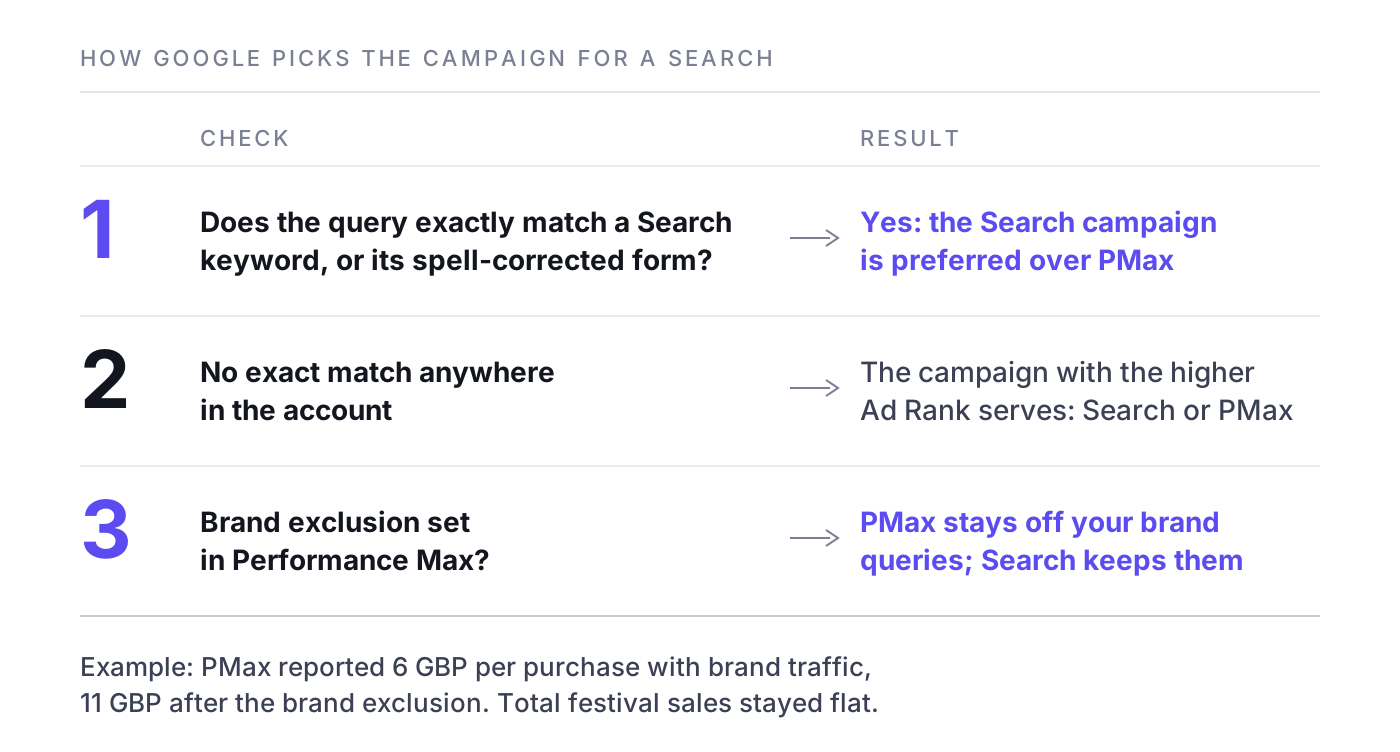
A Search campaign whose keyword exactly matches the query (or a spell-corrected version of it) takes priority over Performance Max. For every other query, the campaign with the higher Ad Rank serves, as Google explains in how Performance Max interacts with other campaigns. In practice, PMax picks up many brand and artist variants ("lakeside sound festival tickets august", "nora vale manchester seats") that people would have clicked anyway. PMax then reports cheap conversions, its average looks excellent, and you scale a campaign whose additional sales are much lower than reported.
The fix:
- Create a brand list (your festival, venue, show) and apply it as a brand exclusion in the PMax campaign.
- Add campaign-level negative keywords for artist and brand terms you cover in Search.
- Keep brand and artist terms in exact and phrase match in Search, so the priority rule works for you.
- Check the PMax search terms report and channel performance report every week. If most conversions come from Search on brand-like terms, the exclusions are not working.
🧮 Worked example: Performance Max
Example: Lakeside Sound Festival runs PMax with two asset groups, "festival weekend" and "day tickets", and past buyers as a signal. Without a brand exclusion, PMax reports 6 GBP per purchase. With the festival name excluded, the reported cost rises to 11 GBP and volume falls by a third, while total festival sales stay flat. The 6 GBP were largely brand searchers; 11 GBP is the figure to compare with Demand Gen and Meta.
Demand Gen and YouTube ads: create demand before people search
Search only harvests. The announce and on-sale need reach among people who have not searched yet: Demand Gen and YouTube video campaigns.
Demand Gen campaigns
Demand Gen runs image, carousel and video ads on YouTube (in-stream, in-feed and Shorts), Discover, Gmail and the Display Network. It optimises toward conversions or clicks and supports lookalike segments built from your first-party lists. Google retired similar segments (the old "similar audiences") in 2023; Demand Gen lookalikes are the closest replacement. Use Demand Gen when you want purchases from new audiences and you have strong vertical and square creative.
YouTube formats and campaign types
- Skippable in-stream: viewers can skip after 5 seconds. Your hook, artist and date must land before then.
- Non-skippable in-stream: 15 seconds (30 seconds mainly on connected TVs). Good for a complete announce message.
- Bumper ads: 6 seconds or shorter, non-skippable. Ideal as reminders: artist, date, city, "on sale Friday".
- In-feed video: appears in search results and the home feed; the viewer chooses to watch.
- Shorts: vertical 9:16 between Shorts. Use native-looking clips, not cut-down TV spots.
Campaign types as currently named: Video reach campaigns (efficient reach with bumpers and skippable ads, non-skippable reach, and target frequency) for reach and frequency; Video views campaigns for views; Demand Gen for conversions, because Video action campaigns no longer exist as a separate type.
Creative that works on YouTube for live events
- Open with live footage, not a logo, and put artist, city and date on screen in the first 3 to 5 seconds.
- Design for sound on: crowd noise and the hit song are part of the message.
- End with one action and one date, for example "Tickets on sale Friday 10am".
- Cut 6, 15 and 20 to 30 seconds from one shoot, plus a 9:16 version.
For hooks and structure that carry across platforms, see creative for live entertainment.
🧮 Worked example: YouTube and Demand Gen
Example: from announce to on-sale, Nora Vale runs a Video reach campaign (efficient reach, bumpers plus a skippable 20-second spot) within 40 km of each city. From the general on-sale, a Demand Gen campaign optimises for purchases with a lookalike segment of past buyers and a remarketing segment of video viewers. Judge the reach campaign on cost per 1,000 unique viewers and on rising artist searches in those cities; judge Demand Gen on cost per verified ticket.
Google display ads: remarketing and reminders, used sparingly
For prospecting, the Display Network often delivers cheap clicks of doubtful quality. For remarketing it can be useful, if you limit it.
- Use responsive display ads with landscape and square key art, date, city and logo.
- Target event page visitors and checkout abandoners, exclude purchasers and app placements that produce accidental clicks.
- Refresh creative when the phase changes.
Example: a display remarketing campaign for Lighthouse: The Musical targets people who viewed a date page in the last 14 days without buying, excludes buyers of the last 30 days, and shows "Last seats this Saturday" in the final week. Budget: 5 percent of the Google Ads total. For abandoned checkouts during queue-heavy on-sales, see retargeting a queue.
Campaign structure along the on-sale cycle
Ticket demand is not flat. Plan your Google Ads campaign along the on-sale phases and change campaign jobs as you go.
- Announce: YouTube reach and Demand Gen to build awareness and presale registrations. Brand and artist Search live from minute one, with presale registration as the conversion.
- Presale: Search for artist and brand terms with "presale" copy, remarketing to registrants via email first. Keep budgets flexible: Google can spend up to twice the average daily budget on a single day, which helps on peak days.
- General on-sale (first 72 hours): the most important days. Raise budgets on brand and artist Search ahead of time, and use a seasonality adjustment in bidding if you expect conversion rates to jump for a few days. Our article on the on-sale curve in the first 72 hours explains why this window shapes the whole run.
- Mid-run: generic Search, PMax and Demand Gen for dates behind forecast; less spend on dates that sell on their own.
- Last call: urgency copy ("last tickets", "this Saturday"), remarketing, bumpers with the date, and a sitelink for every remaining date.
🗓️ Multi-date runs and tours
For tours, keep one campaign per type and one ad group or asset group per city, so you can shift budget between cities without restarting learning. For long runs and residencies, structure ad groups by week or by day type (weekend versus mid-week), because mid-week dates usually need more help. We cover the economics in mid-week dates in multi-date runs.
Example naming convention: NV27_UK_Search_Brand, NV27_UK_Search_Artist (ad groups MAN_14-03, LON_16-03), NV27_UK_Search_Generic, NV27_UK_PMax_Fans, NV27_UK_DG_Lookalike, NV27_UK_YT_Reach_Announce, NV27_UK_Display_Remarketing.
Targeting and audiences: first-party data first
- Customer Match: upload past buyers and subscribers (with consent) for remarketing, exclusions and as signals in PMax and Demand Gen. Eligibility requirements apply.
- Remarketing windows: as a rule of thumb, 7 days for checkout abandoners, 30 days for event page visitors, 180 days for past buyers of similar shows.
- Exclusions: exclude purchasers of the same show from prospecting campaigns, and exclude yesterday's buyers from last-call campaigns.
- Geography: target by "presence" (people in or regularly in your locations) rather than "presence or interest", unless the show draws destination travellers. Use radius targeting around each venue based on where past buyers live.
- Custom segments: for YouTube and Demand Gen, build segments from searches for the artist or similar artists.
What to stop doing: stacking many narrow interests on Display, splitting tiny budgets across dozens of ad groups, and running "presence or interest" location targeting worldwide for a local club show.
Google Ads budget and bidding for an event
How much Google Ads costs is the wrong first question. The right one is how much you can afford to pay per additional ticket, and how many tickets Google can realistically add.
Example: a show needs 2,000 tickets at an average price of 49 EUR, which is 98,000 EUR in gross ticket revenue. The promoter allows 10 percent of gross for paid media, so 9,800 EUR, or 4.90 EUR per ticket. Google Ads gets 40 percent of that, so 3,920 EUR. By phase:
- Announce and presale: 20 percent, 784 EUR
- General on-sale, first 72 hours: 20 percent, 784 EUR
- Mid-run: 30 percent, 1,176 EUR
- Last call (final three weeks): 25 percent, 980 EUR
- Reserve for the date that needs it: 5 percent, 196 EUR
By campaign type, the same 3,920 EUR could split like this: brand and artist Search 1,600 EUR, generic Search 600 EUR, PMax 700 EUR, YouTube and Demand Gen 820 EUR, Display remarketing 200 EUR.
Break-even logic: suppose that after VAT, ticketing fees and the artist's share, the promoter keeps 12 EUR from every additional ticket sold. Then 12 EUR is the break-even marketing cost per additional ticket. The 4.90 EUR target leaves room. In ROAS terms, 49 EUR divided by 4.90 EUR is a ROAS of 10 on gross ticket revenue; break-even is 49 divided by 12, a ROAS of about 4.1. For the full calculation see ROAS for ticket sales and marginal cost per incremental ticket.
🎯 Bidding
- Brand Search: Maximize clicks with a CPC cap, or target impression share at the top of the page. You want to be visible, not to overpay for clicks you would get anyway.
- Artist and generic Search, PMax, Demand Gen: start with Maximize conversions (or Maximize conversion value if you pass real order values). Add a target CPA or target ROAS once the campaign has a stable conversion history; as a rule of thumb, a few dozen conversions in 30 days.
- Short bursts: use seasonality adjustments for on-sale days and data exclusions for days when tracking was broken, so Smart Bidding does not learn the wrong lesson.

Measurement: Google Ads conversions are not ticket sales
Google Ads reports conversions it attributes to itself: data-driven attribution, modelled conversions where consent is missing, and view-through and engaged-view conversions for YouTube and Demand Gen. Meta, TikTok and your newsletter claim some of the same orders, so the sum often exceeds tickets sold.
- Reconcile weekly: compare Google-reported purchases per show with verified ticketing sales per show, and track the ratio over time.
- Judge by cost per verified ticket: Google spend divided by the tickets you can tie to Google.
- Test brand search: pause brand Search in one or two comparable cities for a week (not on on-sale day) and compare total sales, including organic clicks, with the cities that kept running. That tells you how many brand conversions were incremental.
- Test YouTube and Demand Gen: use geo holdouts (comparable regions with and without the campaign) or Google's Conversion Lift studies where your account is eligible.
Our guides to incrementality testing for ticket sales and attribution for live events go deeper on test design.
Google Ad Grants for non-profit cultural organisations
Non-profit theatres, orchestras, museums and festivals with charitable status may qualify for Google Ad Grants: free Search advertising worth up to 10,000 USD per month, through Google for Nonprofits. The programme has strict rules, set out in Google's Ad Grants account management requirements: among other things, a click-through rate of at least 5 percent per month, conversion-based Smart Bidding, at least two sitelinks, and at least one conversion per month.
Grant accounts work best for generic and educational queries ("classical concerts for families") and programme pages. Grant ads show below paid ads, so many organisations run a paid account alongside for competitive title terms. Our Google Ad Grants guide covers eligibility, application and setup step by step.
Common mistakes and a launch checklist
⚠️ Common mistakes
- Brand, artist and generic keywords in one campaign, so nobody knows what generic actually costs.
- Performance Max without brand exclusions, reported as the best campaign in the account.
- GA4 purchase and Google Ads purchase both set as primary conversions.
- Ads or sitelinks still pointing to sold-out dates.
- Broad match without a working purchase conversion or negatives.
- No consent mode in the EU, so remarketing lists and modelling stay empty.
- Judging YouTube on clicks instead of reach, search lift and verified sales.
✅ Launch checklist
- Google tag and Tag Manager live on all pages, auto-tagging on, cross-domain measurement configured.
- Purchase conversion with value, currency and transaction ID tested with a real order.
- Enhanced conversions and consent mode v2 active, checked in Tag Assistant.
- Offline import or click ID pass-through agreed with the ticketing provider if the shop is external.
- Separate Search campaigns for brand, artist and generic, with a shared negative keyword list.
- Responsive search ads with dates and cities, sitelinks per date, price and callout assets.
- PMax brand exclusions and campaign negatives in place before launch.
- YouTube creative in 6, 15 and 20 to 30 seconds plus 9:16.
- Customer Match lists uploaded, buyers excluded from prospecting.
- Budget plan by phase with a reserve, and a weekly reconciliation against ticketing data.
Where NYBA fits
Everything in this guide can be run by hand. What gets hard at scale is coordination: dozens of shows at different points of their on-sale curves, on several channels at once. NYBA OS forecasts ticket demand per show, runs campaigns on Google, Meta, TikTok and other paid channels, shifts budget toward the shows that need it and measures everything against verified ticket sales from the ticketing system, not platform-reported conversions. NYBA works across 1,200+ events per year for 100+ promoters, including Live Nation, Cirque du Soleil and BBC Earth. The NYBA team acts as an expert layer on top of the platform. For the same playbook on social channels, see our guides to Meta ads for events and TikTok ads for events.
Frequently asked questions
How much do Google Ads cost for an event?
There is no minimum spend. You pay per click on Search and mostly per view or impression on YouTube. Set the budget from the tickets you need and what you can afford per additional ticket, as in the example above, rather than from a flat monthly amount.
Are Google Ads worth it for ticket sales?
For known artists, festivals and shows with search demand, brand and artist Search is usually one of the cheapest sources of tickets. For unknown acts, Search alone rarely works; you need YouTube, social and PR to create the demand first.
Can I bid on an artist's name or a competitor's brand?
Bidding on a name as a keyword is generally possible, but trademark rules can restrict using it in ad text. As the promoter or an authorised seller of the show, you have a legitimate reason; as a reseller you also need Google's ticket reseller certification.
Should I use Performance Max for events?
Yes, as an addition, not a replacement. Run it with brand exclusions, campaign-level negatives and your own video, and compare its cost per verified ticket with Search and Demand Gen after excluding brand traffic.
What is AI Max in Google Ads?
AI Max for Search is a set of features inside Search campaigns: broader query matching, automatically generated ad text and automatic landing page selection, with brand and URL controls. It suits generic queries and long runs better than tightly controlled artist campaigns.
Do I need consent mode v2 for Google Ads in Germany or the EU?
If you want to use remarketing, personalised ads and full measurement for EEA users, yes. Google requires consent signals for these features. Whether basic or advanced mode is right for you is a question for your data protection officer.
If you want to see what your Google Ads spend does in verified ticket sales across all your shows, book a demo. One event, clean numbers, then you decide.
Related reading: Concert marketing playbook, Festival marketing strategy, Theatre marketing for long-running shows, How to sell more tickets

What would 3x more
revenue mean for you?
Find out:
