


Meta Ads for Events: A Promoter's Guide to Selling Tickets on Facebook and Instagram
A practical guide to Meta ads for events: tracking with Pixel and Conversions API, campaign structure, audiences, formats, budget per phase and how to check Meta's reported purchases against the tickets you actually sold.


Meta ads for events work differently from Meta ads for almost anything else. Your product expires on a fixed date, your inventory is finite, your buyers often check out on a ticketing domain you do not fully control, and the platform will happily report more purchases than you actually sold. Get the setup, structure and measurement right and Facebook and Instagram are usually the most reliable paid channels a promoter has. Get them wrong and you pay to reach people who have already bought.
This guide follows the order you should work in: tracking, campaign structure in Meta Ads Manager, audiences, formats and creative, budget per phase, and how to read results without fooling yourself.
Key takeaways
- Meta ads for events only optimise well when the ticket shop sends a deduplicated Purchase event with value through both the Meta Pixel and the Conversions API.
- Use the Sales objective, one campaign per show or per tour, and ad sets split by audience temperature: past buyers, warm engagers and broad prospecting.
- Build vertical 9:16 creative first for Reels and Stories, then adapt to 4:5 for Feed; date, city and a reason to buy now belong in the first seconds.
- Shift budget by phase: heavy at announce and on-sale, efficient through the middle, heavy again in the final three weeks, with buyers excluded throughout.
- Treat Meta's reported purchases as a claim, not a fact: compare them every week with verified sales in your ticketing system.
Before you spend: tracking setup for Meta ads for events
Many underperforming event campaigns are tracking problems in disguise. If Meta never sees a reliable purchase signal, it optimises for the wrong people, however good the ad is. Fix this before the announce.
Business portfolio, ad account and permissions
- Run everything inside a business portfolio (formerly Business Manager) that you own. The ad account, the Pixel, the Facebook Page and the Instagram account should all be assigned there.
- If you work with artists, venues or co-promoters, give them partner access to assets rather than handing over logins. When a partnership ends, you keep the data.
- Keep at least two admins with two-factor authentication. Losing access in the middle of an on-sale is entirely avoidable.
Meta Pixel plus Conversions API
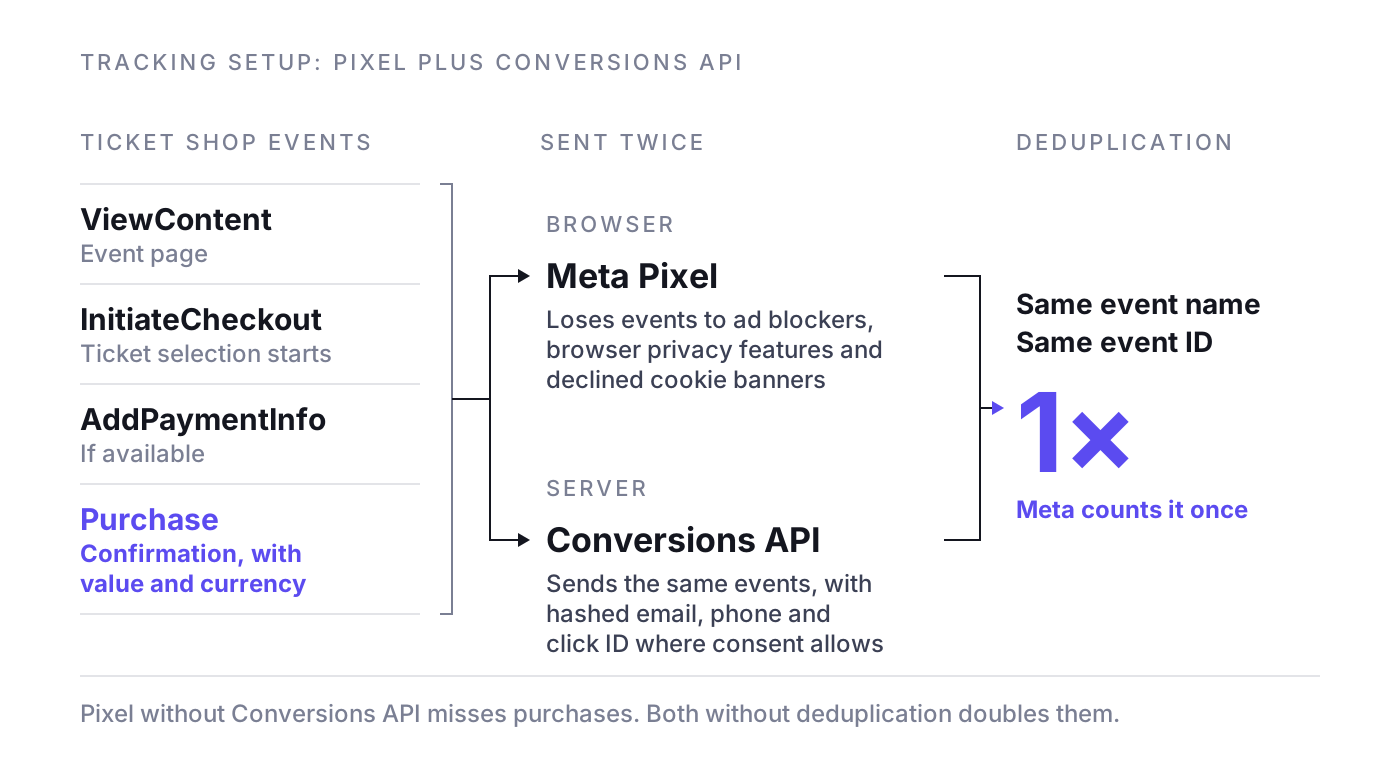
The browser Pixel alone loses events to ad blockers, browser privacy features and declined cookie banners. The Conversions API sends the same events from a server, which recovers a meaningful share of what the browser misses. Run both, and deduplicate them: each event needs the same event name and the same event ID from browser and server so Meta counts it once.
- Required events: ViewContent on the event page, InitiateCheckout when ticket selection starts, AddPaymentInfo if available, and Purchase on the confirmation page. The Meta Pixel standard events guide covers the details.
- Purchase must carry value and currency. Without the actual order value you cannot optimise for value or calculate return on spend honestly.
- Send customer information parameters on server events (hashed email, phone, and click ID where consent allows). This raises match quality, which you can check in Events Manager.
Getting the purchase event out of the ticket shop
This is where event marketing gets messy. Your checkout usually lives on a ticketing platform, not on your website. Check which of these situations you are in:
- Native integration: many ticketing systems let you enter a Pixel ID and sometimes a Conversions API token per event or per organiser. Use it, then test a real purchase in Events Manager.
- Embedded shop on your domain: you can often fire events yourself. Make sure the confirmation step is trackable.
- No access at all: optimise for the deepest event you can measure (often InitiateCheckout on the ticket page) and rely on ticketing exports to judge real sales. This is a compromise, so push your ticketing partner for an integration.
Domain verification and consent
Verify your domain in the business portfolio settings, and the ticketing domain too if your ticketing partner allows it. Verification protects your link previews and is part of a clean setup. In the EU, the Pixel should only fire after consent through your consent management platform, and server events need a valid legal basis as well. Agree the approach with whoever handles data protection for you, because it changes how much signal Meta receives.
Campaign structure in Meta Ads Manager
For ticket sales the objective is Sales, with the website as the conversion location and Purchase as the optimisation event. Do not use Traffic, Engagement or the event response goal of a Facebook event page if what you need is tickets: Meta will deliver exactly what you ask for, and clicks or "interested" responses are cheap because they are not purchases.
One campaign per show or per tour
- Single show or festival: one Sales campaign tied to one on-sale curve.
- Tour or multi-date run: one campaign per tour, with ad sets per city or region if dates differ strongly in demand. Cities that sell themselves should not eat the budget a weak date needs.
Ad sets by audience
Inside the campaign, split by audience temperature rather than by dozens of interests:
- Past buyers and your list (customer list custom audiences, similar shows, same venue).
- Warm engagers (website visitors, video viewers, Instagram and Facebook engagers) who have not bought.
- Prospecting (broad or Advantage+ audience within your geo radius, optionally with lookalikes as suggestions).
Meta's guidance is that an ad set needs roughly 50 optimisation events within a week to exit the learning phase. Most single shows never reach that, so use fewer, broader ad sets. If you'd rather let Meta handle more of the structure, an Advantage+ campaign is a valid alternative for prospecting, as long as your tracking is clean and you watch how much of the spend goes to people who would have bought anyway.
Audiences: past buyers, lookalikes, geo and broad
Past buyers via custom audiences
Your buyer data is your best targeting asset. Upload buyer lists as customer list custom audiences, segmented by artist, genre or venue, and check that your privacy policy and consent cover this use. Use them twice: as a target for the announce and presale, and as an exclusion once people have bought.
Lookalikes
Build lookalikes from purchasers, ideally from a value-based source so Meta learns from your best customers. Small percentages (1 to 3 percent) stay closest to the source. In many current setups lookalikes act as a suggestion inside Advantage+ audience rather than a hard boundary, so judge them by sales, not by the label.
Geo radius
Location is the one hard limit you should always set. Rule of thumb: start with the catchment area based on past buyers' postcodes, not a round number. A club show might sell within 30 to 50 km, an arena show or a destination festival much further. Add tourist markets separately if your show depends on visitors.
Broad with Advantage+ audience
Broad targeting within your geo, with Advantage+ audience on, often beats stacked interests once the Purchase signal is reliable. Let the creative do the targeting: stage footage of the artist filters better than an interest called "concerts". Keep exclusions for existing buyers in place and check that they actually apply in your setup.
Retargeting windows
- Ticket page visitors, no purchase: 3 to 14 days, shorter closer to the show.
- Checkout started, no purchase: 1 to 7 days, with a reminder of date, seat categories and price.
- Video viewers and engagers: 30 to 90 days in the middle of the campaign, shorter in the final weeks.
- Purchasers: excluded from all sales ad sets for this show, included in upsell ads (VIP, parking, merch) if you sell them.
These windows are rules of thumb; a pool of a few hundred people hits high frequency within days. If your on-sale runs through a queue, do not retarget everyone who waited in line: most of them have already bought or given up.
Instagram ads for events: placements, formats and creative
Placements and aspect ratios
- Reels and Stories: 9:16 vertical, full screen. Keep text, logos and the date out of the top and bottom areas where the interface overlays the video.
- Facebook and Instagram Feed: 4:5 vertical takes up more screen space than 1:1 and usually works better on mobile.
- Smaller placements: leave them in with Advantage+ placements, but check the breakdowns and exclude any that bring clicks without purchases.
Produce in 9:16 first, then upload placement-specific versions instead of letting Meta crop a landscape video.
Creative that sells tickets
For Facebook ads for events, creative is the biggest lever you still control. These rules cover most of it:
- Show the experience in the first two seconds: real stage footage, the crowd, the moment people pay for.
- City and date on screen early, inside the safe zone.
- Give a reason to buy now: presale access, a price tier ending, limited categories, a new date added.
- Refresh every one to two weeks in the middle phase. Each refresh should carry a new reason to buy, not just a new colour.
- Test concepts, not buttons: artist talking to camera versus live footage versus venue experience, three to five ads per ad set.
Budget, bidding and frequency by phase
Ticket demand is not flat, so your budget should not be either. A common pattern, used here as a rule of thumb:
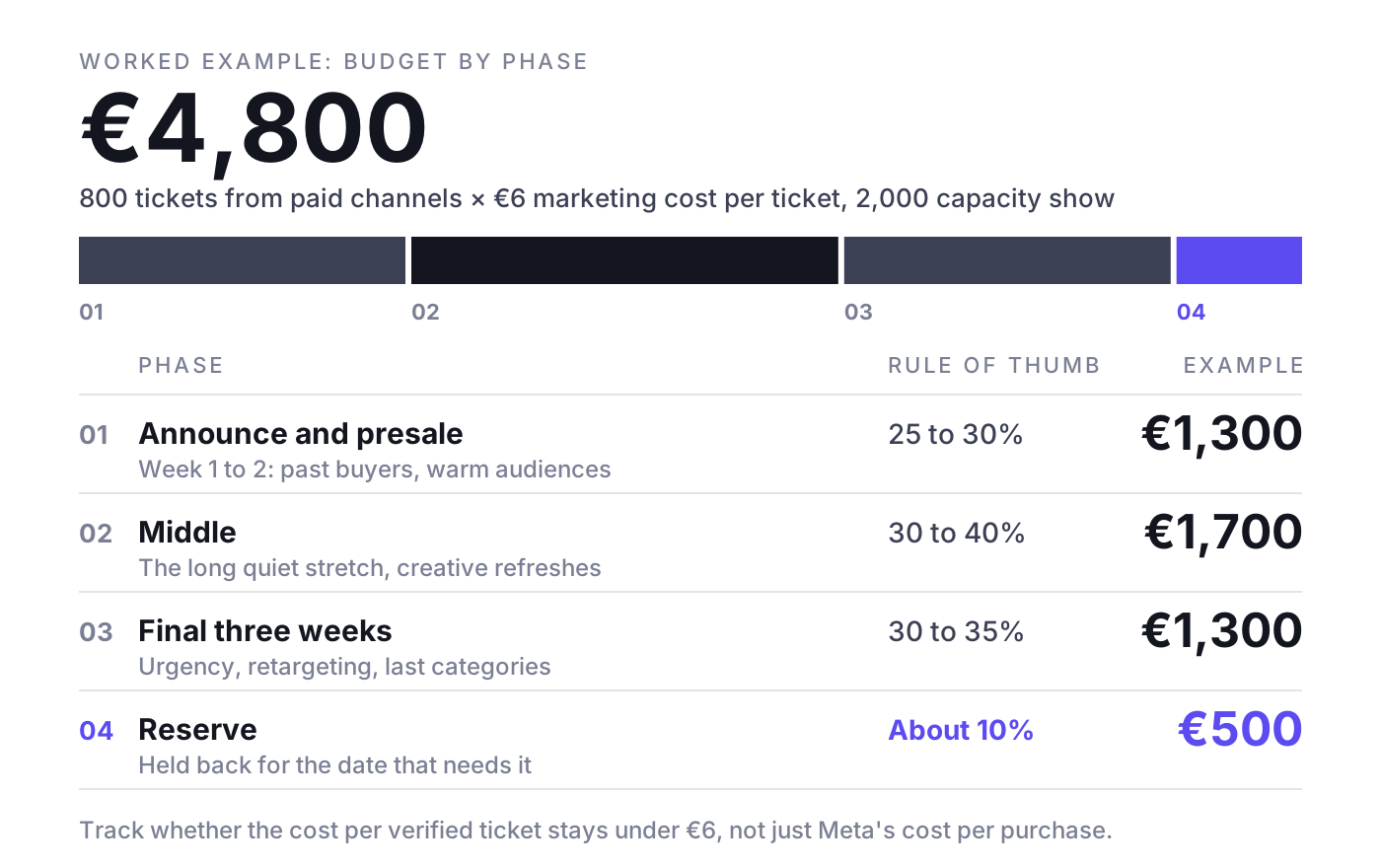
- Announce and presale (weeks 1 to 2): around 25 to 30 percent of the paid budget. Past buyers, warm audiences, presale registration.
- Middle (the long quiet stretch): around 30 to 40 percent, spent efficiently with creative refreshes and new reasons to buy.
- Final three weeks: around 30 to 35 percent. Urgency, retargeting, last categories.
- Reserve: about 10 percent held back for the date that needs it.
Example: a 2,000-capacity show where you need 800 tickets from paid channels and can afford 6 euros of marketing per ticket gives you a paid budget of 4,800 euros. That is roughly 1,300 for the announce, 1,700 for the middle, 1,300 for the final weeks and about 500 in reserve. Track whether the cost per verified ticket stays under 6 euros, not just Meta's cost per purchase. For the full calculation see ROAS for ticket sales.
Bidding
Start with the default highest-volume bid strategy. Move to a cost per result goal (cost cap) or a ROAS goal only when you have enough conversions to make the control meaningful and you know your break-even cost per ticket.
Frequency
Watch frequency per ad set, not per campaign. As a rule of thumb, a prospecting frequency above 3 to 4 per week usually means the audience is saturated or the creative is tired. Retargeting can run higher close to the show, but if frequency climbs and verified sales do not move, you are paying for repetition. Use the Facebook Ads KPI benchmarks to judge CPM, CTR and cost per result against your own history.
How to read results honestly
Meta reports purchases according to its attribution setting. The common default counts a purchase if it happens within 7 days of a click or 1 day of a view, and some of the reported conversions are modelled rather than directly observed. View-through purchases in particular include people who saw an ad and would have bought anyway. For a show with a loyal fan base, that can be a large share.
- Compare weekly: Meta-reported purchases and revenue against verified sales in your ticketing system for the same period. If all platforms together claim more tickets than you sold, someone is double-counting.
- Split click and view: use the attribution comparison columns in Ads Manager to see how much comes from 1-day view. Treat that part with caution.
- Watch daily sales against the required run rate: remaining tickets divided by remaining days. If spend doubles and the daily ticket curve does not move, the extra spend is not incremental.
- Test incrementality: pause or halve spend in one comparable city for a week, or use Meta's conversion lift studies where available, and see what happens to verified sales.
Typical mistakes with Meta ads for events
- Optimising for clicks or event responses instead of purchases.
- No value on the Purchase event, so ROAS figures are invented.
- Pixel without Conversions API, or both without deduplication, which doubles purchases.
- Not excluding buyers, so your best fans see sales ads for tickets they already hold.
- Running the same creative for six weeks and blaming the audience.
- Going dark in the middle and trying to buy back the gap in the final week.
- Trusting Ads Manager over the box office.
For a wider plan beyond Meta, from owned channels to the final week, see how to promote an event.
Where NYBA fits
For a single show, all of this works by hand in Ads Manager and a spreadsheet. It gets hard with many shows at once, each with its own curve. NYBA OS is the Revenue OS for live entertainment: it forecasts ticket demand per show, runs campaigns on every channel that sells tickets (Meta, Google, TikTok and other paid channels), shifts budget toward the shows that need it, and measures everything against verified ticket sales from the ticketing system instead of platform-reported purchases. The track record: 75M+ tickets, 1,200+ events per year and 100+ promoters, including Live Nation, Cirque du Soleil and BBC Earth. The NYBA team works as the expert layer on top of the platform.
Frequently asked questions
Which campaign objective should I use for Meta ads for events?
Use Sales with the website as the conversion location and Purchase as the optimisation event. Only fall back to a higher-funnel event like InitiateCheckout if your ticket shop cannot send purchases.
How much should I spend on Facebook ads for an event?
Work backwards: take the tickets you need from paid channels and multiply by the marketing cost per ticket your margin allows. Split that across phases and keep about 10 percent in reserve.
Do I need the Conversions API if the Pixel already works?
In most cases, yes. The browser Pixel misses purchases because of ad blockers, browser restrictions and declined consent. Server events recover part of that signal, as long as you deduplicate with a shared event ID.
Why does Meta report more ticket sales than I see in my ticketing system?
Meta counts purchases within its attribution window, includes view-through and modelled conversions, and other platforms claim the same buyers. Your ticketing system is the reference; use it to judge spend.
If you want Meta and every other paid channel run against demand forecasts and verified ticket sales, book a demo. One event, clean numbers, then you decide.
Related reading: Meta Conversions API for ticket sales, Meta Pixel standard events, Facebook Advantage+ campaign creation, Incrementality testing for ticket sales

Was würde 3x mehr
Umsatz für dich bedeuten?
Finde es heraus:
