


How to Promote an Event: A Step-by-Step Plan From Announcement to Doors
A practical plan for how to promote an event: what to do in each phase from pre-announce to doors, a playbook for every channel that sells tickets, a rule-of-thumb budget split and one simple way to see whether your promotion is actually working.


Knowing how to promote an event is less about finding a secret channel and more about doing the right things in the right order. Most shows that struggle do not fail because the promoter picked the wrong platform. They fail because the budget was spread evenly, the email list was used only once, the middle of the campaign went quiet and nobody looked at daily ticket sales until three weeks before doors.
This guide gives you a plan you can run on your next show: a phase-by-phase timeline from pre-announce to the day of the show, a playbook for every channel that actually sells tickets, a rule-of-thumb budget split, a posting calendar, a simple way to tell whether your promotion is working, and the mistakes to stop making today. If you want the strategy that sits above this plan, start with the event marketing guide.
Key takeaways
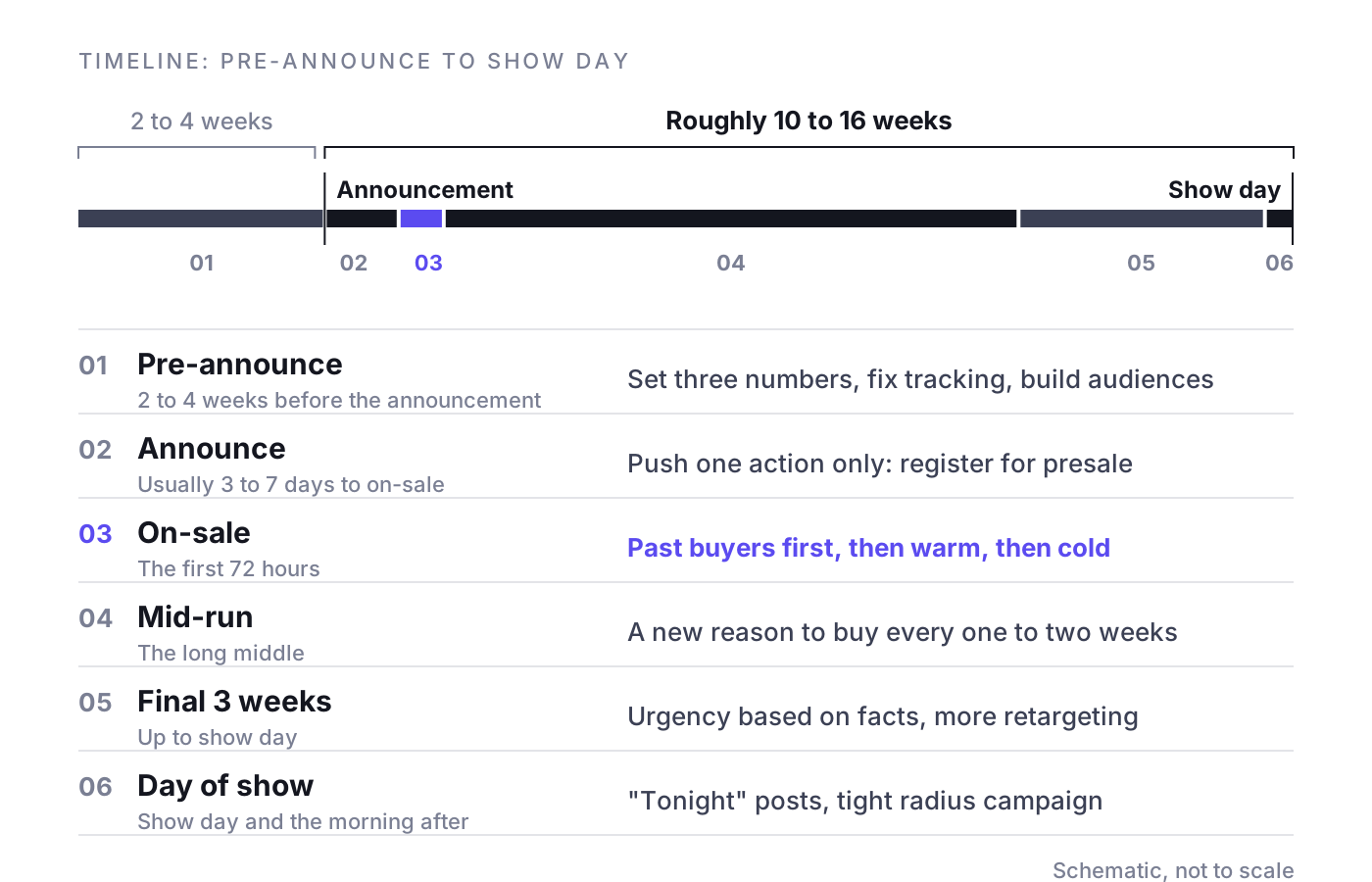
- To promote an event, follow a phased plan over roughly 10 to 16 weeks: pre-announce, announce, on-sale, mid-run, final 3 weeks and show day.
- Set up tracking, build past-buyer audiences and open a presale registration page before the announcement goes live.
- Email past buyers and presale registrants first, then warm paid audiences, then cold prospecting, and exclude buyers from every subsequent ad and email.
- Keep the mid-run alive with a new reason to buy every one to two weeks, and hold about 10 percent of the budget in reserve.
- Judge promotion by tickets sold per day from your ticketing system against the required run rate: remaining tickets divided by remaining days.
How to promote an event: the week-by-week timeline
The plan below assumes a campaign of roughly 10 to 16 weeks between announcement and show day.
Phase 1: Pre-announce (2 to 4 weeks before the announcement)
- Set three numbers. The tickets you need to sell, the date by which you must know whether you are on track, and the maximum marketing cost per ticket you can afford.
- Set up tracking before anything goes live. Pixel and server-side events on your ticketing pages, UTM parameters on every link, and access to daily sales data from the ticketing system.
- Build your audiences. Export past buyers, segment them by genre, venue and distance, and upload them as custom audiences and exclusion lists.
- Prepare a presale registration page so the announcement collects emails rather than just likes.
- Produce the first creative set: announcement video, static key visual in all formats, short clips of the artist or show, and a partner kit for venue, artist and sponsors.
Phase 2: Announce (announcement to on-sale, usually 3 to 7 days)
- Announce on every owned channel within the same hour: artist, venue, promoter, email, Facebook event.
- Push one action only: register for presale or save the date. Do not ask people to follow, share and buy at the same time.
- Run a small paid reach campaign to warm audiences so the on-sale has people to retarget.
Phase 3: On-sale (the first 72 hours)
The first three days set the shape of the whole campaign, which is why the on-sale curve in the first 72 hours deserves its own analysis. Email past buyers and presale registrants first, then open paid campaigns to warm audiences, then to cold prospecting. Announce the on-sale on all channels with a direct ticket link.
Phase 4: Mid-run (the long middle)
After the on-sale spike, sales drop to a lower daily rate. This is normal. The mistake is going quiet. Use this phase to:
- Release new reasons to buy every one to two weeks: support act, setlist hints, venue details, reviews, behind-the-scenes clips.
- Test new creative angles and kill the ones that do not move ticket sales.
- Shift budget to the dates, cities or price tiers that are behind their target.
- Compare daily sales against your required run rate every week (more on that below).
Phase 5: The final 3 weeks
- Switch to fact-based urgency: "Last 200 tickets", "Upper tier sold out", "Two weeks to go".
- Step up retargeting to everyone who visited the ticket page and did not buy.
- Email non-openers with a different subject line, then send a final call.
- Activate local reach: radio, listings, venue screens, partner newsletters.
- Ask the artist for their final-week posts.
Phase 6: Day of show
- Post "tonight" content with door times, set times and box office information.
- If tickets remain, run a tight radius campaign around the venue and stop it at a set cutoff time.
- The morning after, send a thank-you email and, if possible, announce the next date while attention is high.
Channel playbooks: where event promotion actually sells tickets
Good event promotion uses each channel for the job it does best. Here is what to do on each one.
How to promote an event on Facebook
- Create a Facebook event and add the venue and artist as co-hosts so it appears on all their pages. Put the ticket link at the top of the description.
- Post updates inside the event (lineup news, set times, last tickets). People who responded get notified, which makes the event a free reminder channel.
- Treat "Interested" as a soft signal, not a sale. Retarget event responders with a direct ticket ad.
- Run at least two campaigns: prospecting optimized for purchases and retargeting for ticket page visitors, video viewers and event responders. Exclude existing buyers with a customer list upload.
How to promote an event on Instagram
- Lead with Reels: 7 to 15 seconds of real show footage with the date and city on screen in the first second.
- Use Stories with the link sticker and the countdown sticker in the announce phase and the final week.
- Publish collab posts with the artist and venue so one post reaches all three audiences.
- Reuse your best organic Reels as ads; they usually outperform polished key visuals.
TikTok
TikTok rewards native content: vertical, sound on, made by a person, not a brand. Ask the artist or performers to post, then boost the posts that work as Spark Ads. Keep targeting broad and let the creative find the audience. Judge TikTok on ticket sales from your ticketing system, not on views.
Google search
People who search for the artist plus "tickets" or the event name plus the city have already decided. Run a search campaign on your event name, artist name plus city and venue name plus the date. Keep the budget tied to search volume; you cannot create demand here, only capture it. Watch for resellers bidding on your name; if they outbid you, your buyers end up on someone else's listings.
Email and past buyers
Past buyers bring you the cheapest tickets you will sell. A simple sequence works for most shows:
- Announcement with presale registration.
- Presale reminder the day before.
- Presale opens, with a code or a direct link.
- General on-sale.
- One mid-run update with new information.
- Final call in the last week.
Remove buyers from every subsequent send. Nothing burns a list faster than asking people to buy a ticket they already have.
Venue and partner channels
Venues have newsletters, websites, screens and poster sites. Partners such as local bars, hotels, sponsors, student unions and fan clubs have audiences that trust them. Give each partner a kit with artwork in every format, two ready-to-use posts and a tracked link or code so you can see what they sold.
PR and local media
Press works best at two moments: the announcement and the final three weeks. Get the event into every listings site and local calendar at announce. Pitch a story angle, not just the date. Radio and media giveaways cost you tickets rather than cash and buy reach close to the show.
The artist's own channels
The artist often has the largest and most engaged audience of anyone involved. Agree on posting commitments as part of the booking: at minimum announce, on-sale and final week. Send the artist ready-made assets and a tracked link, and make it easy for them to post collab content.
What to post when: how to promote an event on social media
A posting calendar keeps the campaign alive between the spikes. Use this as a starting point and adjust it to your timeline:
- Pre-announce: teasers without details, "something is coming", a call to register.
- Announce day: the announcement video, key visual, presale registration link, Facebook event.
- Presale and on-sale: "Presale opens tomorrow", "Presale live now", "General sale live", with the direct ticket link in every post.
- Mid-run, weekly: one new reason to buy (lineup addition, venue feature, rehearsal clip, review, fan content), plus one direct ticket post.
- Final 3 weeks: countdown posts, "last tickets" updates based on real inventory, practical information (getting there, door times, age policy).
- Day of show: "Tonight", box office times, live Stories.
- After the show: thank-you, photos, and the next date.
If you need fresh ideas for the mid-run, the guide to selling more tickets covers offers, bundles and pricing moves that give you new things to say.
Budget split by phase (a rule of thumb)
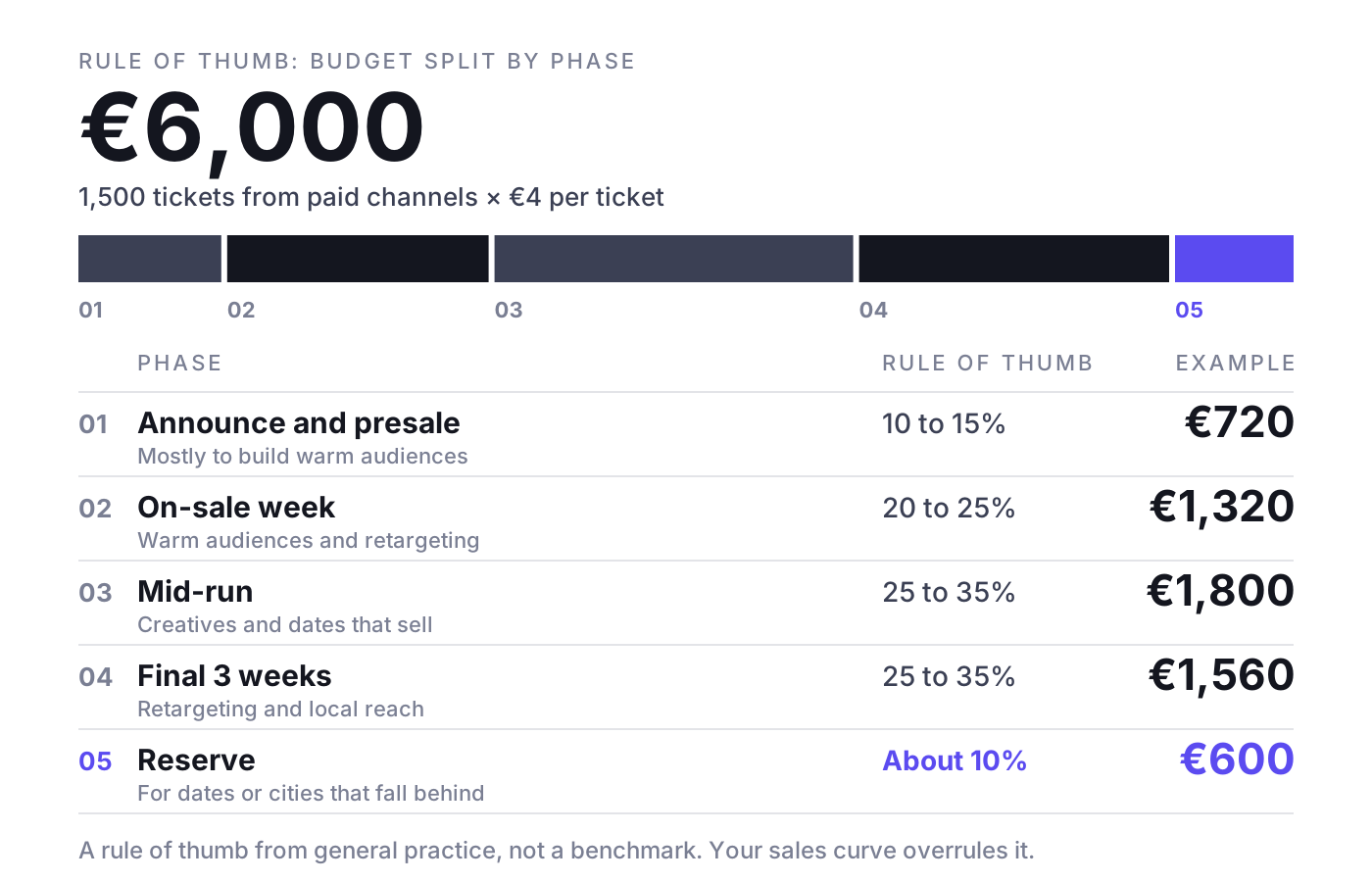
Start with the total. A practical formula: tickets you need to sell from paid channels multiplied by the marketing cost per ticket you can afford. Then split it by phase. The ranges below are a rule of thumb from general practice, not a benchmark. Your show's own sales curve should take precedence.
- Announce and presale: 10 to 15 percent, mostly to build warm audiences.
- On-sale week: 20 to 25 percent, focused on warm audiences and retargeting.
- Mid-run: 25 to 35 percent, steady spend on the creatives and dates that sell.
- Final 3 weeks: 25 to 35 percent, retargeting and local reach.
- Reserve: about 10 percent held back for the dates or cities that fall behind.
Example: You need 1,500 tickets from paid channels and can afford €4 of marketing cost per ticket. Total budget: €6,000. Split: €720 announce, €1,320 on-sale week, €1,800 mid-run, €1,560 final three weeks, €600 reserve.
How to tell whether your promotion is working
Likes, reach and Facebook event responses tell you whether people saw the campaign. Only ticket sales tell you whether it worked. Use tickets sold per day from your ticketing system as the main metric and compare it against two lines.
- Baseline: what the show sells per day without extra pushes. Take it from comparable past shows, or from a quiet week in this campaign.
- Required run rate: remaining tickets divided by remaining days.
Example: Six weeks before the show you have 900 tickets left and 42 days to go. The required run rate is about 21 tickets per day. The seven-day rolling average is 14 per day. You are 7 tickets per day short, so you either step up the pressure now (new creative, more budget, partner push) or accept a lower final count. Waiting until the final three weeks makes the gap three times larger per day.
Two more checks:
- Compare platform-reported purchases with actual ticketing sales. If Meta, Google and TikTok together claim more tickets than you sold, you are counting the same buyer twice.
- When you increase spend, check whether daily sales rise above baseline. If they do not, the extra budget bought tickets that would have sold anyway.
The full set of numbers worth tracking is in the guide to ticket sales KPIs.
How to promote a concert: what changes
Most of the plan above applies to any live event. If you need to know how to promote a concert specifically, add these points:
- Fan club and artist presale first. The artist's core fans will buy in the first hours. Give them a presale and keep your paid budget for everyone else.
- Use the support act as a content beat. Announcing support in the mid-run gives you a new reason to post and reaches a second fan base.
- Show the live experience. Clips from past concerts sell better than studio photos.
- On a tour, manage cities separately. Each city has its own curve. Move budget from cities that sell themselves to cities that are behind.
For the full concert-specific approach, read the concert marketing playbook.
Common event promotion mistakes
- Spending the same amount every day regardless of how the show is selling.
- Launching ads before tracking works and then guessing which channel sold tickets.
- Judging success by likes or "Interested" responses instead of tickets sold per day.
- Running one creative for the whole campaign. Fatigue sets in long before show day.
- Not excluding buyers from ads and emails.
- Going dark in the mid-run and then trying to catch up in the final week.
- Panic discounting right before the show, which teaches your audience to wait next time.
- Trusting platform-reported purchases without checking them against the ticketing system.
Where NYBA fits
Everything in this plan can be done by hand with a spreadsheet and the ad managers. It gets hard when you run many shows at once, each with its own curve. NYBA OS is the Revenue OS for live entertainment: it forecasts ticket demand per show, runs campaigns on every channel that sells tickets (Meta, Google, TikTok and other paid channels), shifts budget toward the shows that need it, and measures everything against verified ticket sales from the ticketing system rather than platform-reported purchases. The track record: 75M+ tickets, 1,200+ events per year and 100+ promoters, with clients including Live Nation, Cirque du Soleil and BBC Earth. The NYBA team works as the expert layer on top of the platform.
Frequently asked questions
How far in advance should you start promoting an event?
For most concerts and shows, announce 10 to 16 weeks before the date and start preparing tracking, audiences and creative 2 to 4 weeks before that. Smaller local events can work with 4 to 6 weeks; large festivals and tours often announce many months ahead.
How much should you spend to promote an event?
Work backwards: the tickets you need from paid channels multiplied by the marketing cost per ticket your margin allows. Then split the total by phase and keep about 10 percent in reserve for the dates that fall behind.
How do you promote an event online without a big budget?
Use the channels you already own: past buyer emails, a Facebook event co-hosted with the venue and artist, artist collab posts on Instagram, partner newsletters and free listings. Spend what paid budget you have on retargeting people who already visited the ticket page.
How do you know which channel sold the tickets?
Use tracked links and codes per channel and partner, and compare every platform's reported purchases with the actual sales in your ticketing system. When the platforms together claim more than you sold, test by changing spend in one channel and watching daily sales.
If you want to run this plan with demand forecasts and verified ticket sales behind every budget decision, book a demo. One event, clean numbers, then you decide.
Related reading: What to do when a show is not selling, Meta Conversions API for ticket sales, Creative for live entertainment, Incrementality testing for ticket sales

Was würde 3x mehr
Umsatz für dich bedeuten?
Finde es heraus:
