


Snapchat Ads for Events: How Promoters Sell Tickets with Snap Ads, Lenses and Geofilters
A practical guide to Snapchat ads for events: Snap Pixel and Conversions API setup, campaigns along the on-sale cycle, audiences, Story and Collection Ads, Lenses and geofilters at the venue, age gating, budgets and honest measurement.


Snapchat ads are the most underused paid channel in live entertainment. Promoters who already run Meta, Google and TikTok often skip Snapchat entirely, even though it reaches the people who fill clubs, festivals and arena floors, and even though it has something no other platform can offer an event: a camera people open at the venue itself. Run it like a second Instagram and it will disappoint you. Run it for what it is, a mobile-first, camera-first platform with sharp location tools, and it can become a reliable source of tickets for younger audiences.
This guide covers the setup in Snap Ads Manager, tracking, campaign structure, audiences, formats, budgets, age gating and how to check Snapchat's numbers against the tickets you actually sold.
💡 Key takeaways
- Snapchat ads sell tickets best for audiences roughly 18 to 34: club nights, festivals, urban, pop, hip-hop and electronic shows, comedy and student events.
- Run the Snap Pixel and the Conversions API together, deduplicated with a shared event ID and order ID, or the Sales objective has nothing reliable to learn from.
- Use the Sales objective for on-sale and last call, Awareness and Engagement for announce, and Lenses or Filters geofenced to the venue on show day.
- Build everything in 9:16 vertical video, with date, city and a reason to buy now in the first two seconds and the headline under 34 characters.
- Count only tickets your ticketing system can tie to Snapchat; platform-reported purchases are a claim to check, not a result.
Why Snapchat ads work for ticket sales (and where they do not)
Snapchat is a messaging and camera app first. For promoters that has three consequences.
- The audience skews young. If your buyers are 18 to 34, Snapchat reaches many of them in a place where your competitors are usually not bidding. If your core buyer is 50 and books theatre subscriptions, Snapchat is rarely the right channel. Check the estimated audience size for your city and age range in Ads Manager before you commit budget.
- Buying is social. Club nights and festivals are decided in group chats. Snapchat is where those chats happen, so creative that gives people something to send to a friend ("who is coming?") does more work here than on most platforms.
- Location is native. Snap Map, geofilters and location-based Lenses make the venue part of the product. No other paid channel lets you put your branding inside the camera of people standing outside your doors.
The limits are real too. Snapchat reaches fewer people over 35, ticketing integrations are less common than for Meta, and much of the audience is under 18, so 18+ and alcohol-sponsored events need strict age targeting. Treat Snapchat as a channel that adds incremental young buyers to a Meta and Google baseline, not as a replacement for them. The Meta ads guide for events and the TikTok ads guide for events cover the channels Snapchat usually runs alongside.
Account and tracking setup in Snapchat Ads Manager
Do this before the announce. Most disappointing Snapchat campaigns are tracking problems.
Business account, Public Profile and ad account
- Create a Snapchat business account and open Snap Ads Manager. Set up one ad account per legal entity and currency, and invite partners through member roles instead of sharing logins.
- Create a Public Profile for your brand, festival or venue; a profile with Stories and Spotlight posts makes paid reach more credible. Keep at least two admins.
🔁 Snap Pixel plus Conversions API
The Snap Pixel is a browser tag that reports what people do after they tap your ad. On its own it loses events to ad blockers, browser privacy features and declined cookie banners. The Snap Conversions API sends the same events from a server and recovers part of that loss. Run both.
- Events to send: PAGE_VIEW on every page, VIEW_CONTENT on the event page, START_CHECKOUT when ticket selection begins, PURCHASE on the confirmation page with price (actual basket value), currency and number of items. ADD_CART is useful if your shop has a clear basket step.
- Deduplication: Snap matches browser and server events when both use the same Pixel ID, the same event name, and the same identifier: the Pixel's client_dedup_id must equal the Conversions API event_id. For purchases, also send the order number as transaction_id in the Pixel and order_id in the API. Snap's deduplication documentation gives a 48-hour window for the event ID pair and up to 30 days for purchase order IDs.
- Match quality: send hashed email and phone number with server events where consent allows it.
- Test: use the Snap Pixel Helper extension, buy a real ticket and confirm exactly one PURCHASE with the right value arrives.
When the ticket shop sits on a third-party domain
Many promoters sell through a ticketing company's checkout where you cannot add your own tags. In order of preference:
- Ask the ticketing provider whether it supports the Snap Pixel or a server-side integration. Some do, often in the event or organiser settings.
- If not, ask for an order webhook or a frequent order export with order ID, timestamp, value and the UTM parameters of the session. Send those orders to the Conversions API yourself, with order_id for deduplication.
- As a last resort, run a landing page on your own domain with the Pixel, optimise for a "ticket button click" or VIEW_CONTENT event, and accept that Snapchat is learning from intent rather than purchases. Use UTMs to measure sales on the ticketing side.
You solve this once for every channel with a ticketing-first data layer.
🔒 UTMs and consent
- Tag every ad URL. Example: utm_source=snapchat&utm_medium=paid_social&utm_campaign=summerfest26_onsale&utm_content=lineup_video_a. Make sure the ticketing system keeps UTMs through to the order.
- In the EU and UK, fire the Pixel only after consent and document the legal basis for server-side events with your data protection lead. Server-side tracking is not a way around consent.
Campaign structure along the on-sale cycle
Snapchat campaigns have three levels: campaign, ad set (formerly called ad squad) and ad. The campaign holds the objective. Snapchat currently offers five: Awareness and Engagement, Traffic, Leads, App Promotion and Sales. For ticketing you will mostly use Sales, with Awareness and Engagement for announce and venue moments, and Leads where you collect presale registrations inside Snapchat.
A naming convention keeps reporting readable. Example: SC | Summerfest26 | ONSALE | Sales-Purchase | Berlin-50km | 18-34.
Announce (week 0)
- Objective: Awareness and Engagement for reach and video views among your core age group in the catchment area, or Leads if you run a presale signup.
- Creative: the reveal: lineup, date, venue. A Story Ad with one Snap per headliner works well.
- Goal: build a pool of video viewers and swipe-ups to retarget at on-sale.
⚡ Presale and general on-sale (first 72 hours)
- Objective: Sales, optimised for PURCHASE. If your Pixel has very little purchase history, start with START_CHECKOUT for the first days and switch once purchases accumulate.
- Ad sets: one for presale registrants and engagers (warm), one for lookalikes and broad 18 to 34 targeting in the catchment (cold). Exclude buyers from both.
- Timing: go live 30 minutes before tickets drop and front-load budget. Most of the money in an on-sale is made or lost in this window, see the on-sale curve.
Mid-run
- Reduce spend, keep efficient ad sets running and rotate creative every two to three weeks.
- Use Collection Ads to show ticket tiers, dates or the lineup as tappable tiles.
- If the verified cost per ticket stays above break-even for two weeks, pause and move the budget.
Last call (final three weeks) and show day
- Scale Sales campaigns again, with urgency creative: "Last 300 tickets", "Prices go up Friday".
- On show day, run a Filter or Lens geofenced to the venue and surrounding streets, plus a small Sales ad set with a radius of a few kilometres if box office or late tickets are still available.
Multi-date runs and tours
- Run one campaign per city or venue so budget and location targeting stay clean.
- Collection Ads suit residencies and multi-date runs: each tile is a date that links straight to that performance's ticket page.
- Move budget weekly toward the dates behind plan. The tour marketing guide explains how to set city-level targets.
Targeting and audiences on Snapchat
First-party data
- Customer lists: upload hashed emails or phone numbers of past buyers for retargeting and as lookalike seeds. Only use data you are allowed to use for advertising.
- Pixel audiences: event page visitors, checkout starters and buyers, each with its own retention window.
- Engagement audiences: people who watched your video ads, swiped up, opened a Lens or viewed your Public Profile.
Lookalikes
Snapchat Lookalike Audiences come in three sizes: Similarity (closest match, smallest), Balance and Reach (largest). Seed them with buyers of comparable past events, not with everyone who ever visited your website. Start with Balance in the on-sale and test Reach once you have scale.
Retargeting windows
- Checkout starters: last 7 days during on-sale, extended to 30 days in last call.
- Event page visitors and video viewers: 30 days.
- Past buyers of similar shows: 180 days or more, used as a seed and for announce.
- Always exclude buyers of this show. Showing on-sale ads to people who already have tickets is the most common waste on every platform.
📍 Location targeting around venues
- For general on-sale, target the realistic catchment: the city plus a radius that matches how far people travel for this event type. A club night might be 25 km, a festival 150 km or more.
- For show day and on-site activations, draw a tight radius or geofence around the venue, the entrance area, nearby transport hubs and pre-party bars.
- Lifestyle Categories such as music fans or nightlife can help small cold audiences; stacking several usually shrinks reach more than it improves quality.
What to stop doing
- Stop targeting all ages from 13 upward "for reach". You pay for people who cannot buy or attend.
- Stop using Traffic as your main ticket campaign; it finds tappers, not buyers.
- Stop splitting small budgets into many ad sets.
🪪 Age gating for 18+ and alcohol-sponsored events
If the event is 18+ or a drinks brand is a sponsor, age targeting is not optional. Snap's policy on regulated goods requires alcohol ads to exclude anyone under the legal drinking age where the ad runs, with country minimums such as 21+ in the United States, 19+ in Canada and 25+ in Sweden. It also requires a "drink responsibly" message and forbids showing anyone who appears under 25 drinking.
- Set the minimum age in every ad set showing the sponsor's branding, including Lenses and Filters.
- For 18+ events without alcohol content, still set 18+ as the minimum age. You save money and avoid selling to people who will be turned away at the door.
- In the EU and UK, Snapchat restricts most targeting and optimisation tools for users under 18.
Snapchat ad formats and creative for live events
All main Snap ads formats are full-screen vertical. According to Snap's ad formats and specs page, Single Image or Video ads, Story Ads and Collection Ads use 9:16 at a minimum of 720 x 1280 pixels, video between 3 and 180 seconds, a brand name of up to 25 characters and a headline of up to 34 characters. Upload 1080 x 1920 where you can and keep text away from the top and bottom edges, where the interface sits.
The formats that matter for tickets
- Single Image or Video: the workhorse for Sales campaigns, usually 6 to 15 seconds.
- Story Ads: a branded tile in Discover that opens into a series of Snaps. Good for lineup reveals and multi-act bills.
- Collection Ads: one video or image with tappable tiles underneath. Use tiles for dates, ticket tiers or headliners.
- Commercials: non-skippable for the first six seconds, useful for a festival trailer.
- Spotlight ads: ads that appear between Spotlight videos. Treat them like short-form video, native in style, not polished trailers.
- Sponsored Snaps: ads delivered into the Chat inbox where available; test them for warm retargeting.
- AR Lenses and Filters: branded camera experiences. Lens Web Builder lets you build simple Lenses and Filters without coding. Sponsored placements are bought in Ads Manager; small, geofenced custom Filters and Lenses can also be bought through Snapchat's own create tools for a set place and time window, depending on your market.
✨ Lenses, Filters and geofilters at the venue
Many people search for how to create a Snapchat filter for an event. For promoters, a custom Snapchat filter or Lens is an amplifier, not a ticket seller: every Snap sent from the venue with your frame reaches the sender's friends, exactly the people you want next year.
- Geofence the venue, entrances, campsite and nearby transport for the event hours. Keep the design simple: event name, date, a frame that looks good on a selfie.
- A countdown Lens in the catchment before the event feeds your engagement audience for retargeting.
- Measure a Lens by uses, shares and engagement audience growth, not purchases.
⏱️ What works in the first two seconds
- Lead with the artist, the crowd or the drop, not the logo. Put date and city on screen early and caption everything.
- Phone-shot crowd footage often beats polished trailers on Snapchat; test both. More in creative for live entertainment.
Example ad copy (headline up to 34 characters)
- Announce: "Summerfest 2026. Lineup is out" (30 characters)
- Presale: "Presale opens Thursday 10am" (27 characters)
- On-sale: "Berlin, 18 July. Tickets live" (29 characters)
- Last call: "Last 300 tickets. Don't wait" (28 characters)
- Show day: "Doors at 8. Box office open" (27 characters)
Snapchat ads cost: budget and bidding by phase
Snapchat ads cost depends on your audience, season and competition, so there is no honest universal CPM. What you can control is the price you are willing to pay per ticket. Ads Manager offers Auto-Bid, Target Cost and Max Bid. Start with Auto-Bid in the on-sale so the system can learn, then move to Target Cost once you know your real cost per ticket. The minimum daily budget per ad set is low, but a few euros per day will not give the Sales objective enough purchases to learn from.
Start with break-even
Your break-even cost per ticket is the contribution one extra ticket brings after VAT, fees and variable costs. Spending more than that per ticket loses money, however good the platform numbers look. The full method is in marginal cost per incremental ticket.
🧮 Worked example
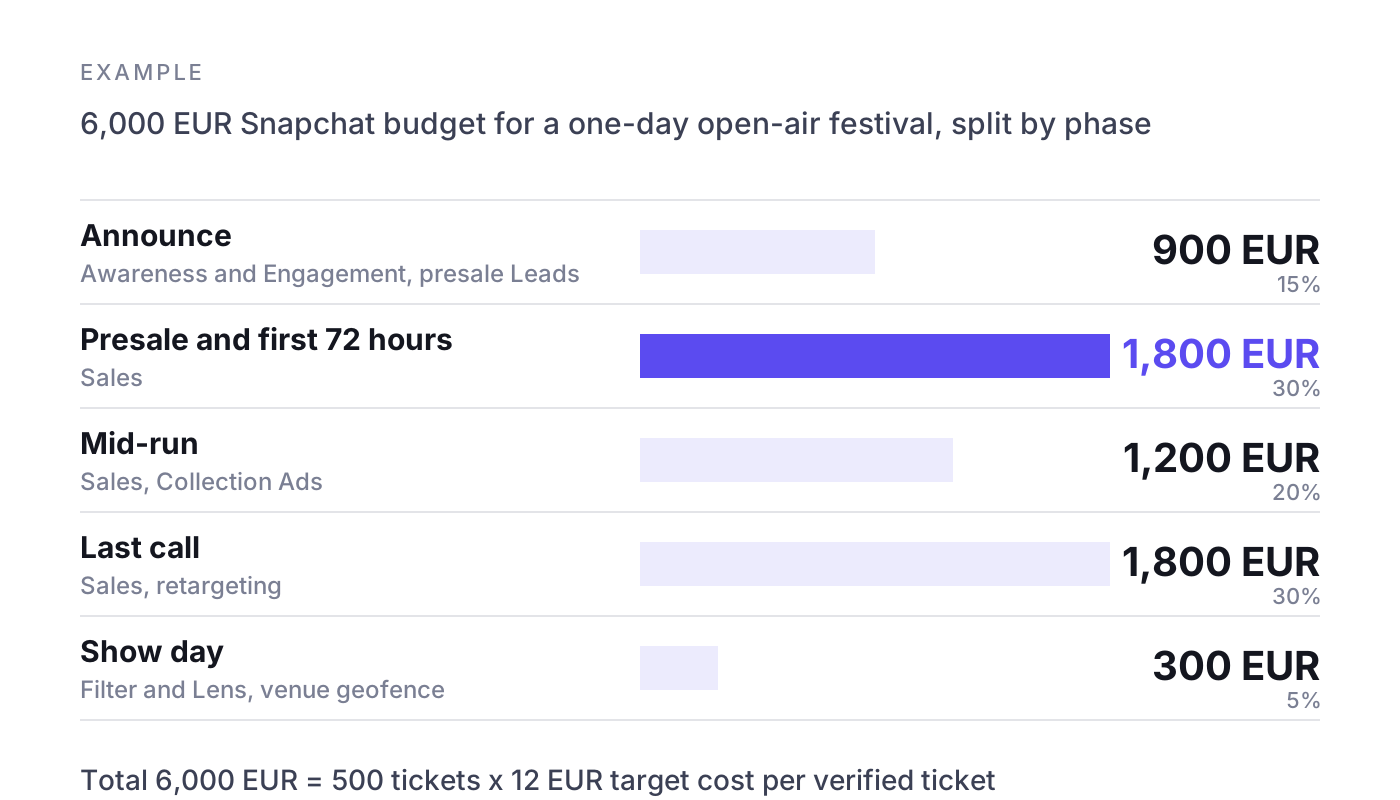
Example: a one-day open-air festival with 4,000 tickets at 49 EUR. After VAT and fees, 41 EUR per ticket remains; variable costs per visitor are 15 EUR. The contribution per ticket is 26 EUR, so the break-even cost per ticket is 26 EUR. The promoter sets a target of 12 EUR per verified ticket on Snapchat, leaving room for error, and plans for 500 tickets from Snapchat. Budget: 500 x 12 EUR = 6,000 EUR.
- Announce: 900 EUR (15 percent), Awareness and Engagement plus presale Leads.
- Presale and first 72 hours: 1,800 EUR (30 percent), Sales.
- Mid-run: 1,200 EUR (20 percent), Sales plus Collection Ads.
- Last call: 1,800 EUR (30 percent), Sales and retargeting.
- Show day Filter and Lens: 300 EUR (5 percent), geofenced to the venue.
Suppose Snapchat reports 700 purchases, while the ticketing system ties 420 orders to utm_source=snapchat. The platform view says 6,000 / 700 = 8.57 EUR per ticket. The verified view says 6,000 / 420 = 14.29 EUR. Both are under the 26 EUR break-even, so the channel is profitable, but the verified figure is the one you plan next year's budget with.
Measuring Snapchat ads against real ticket sales
Snapchat counts a purchase when someone bought after seeing or tapping an ad within the attribution window, including view-through conversions. Meta, Google and TikTok may claim the same buyer, so added up, platforms usually report more tickets than you sold.
- Reconcile weekly: compare Snapchat-reported purchases with ticketing orders carrying Snapchat UTMs. A sudden jump in the ratio usually means a tracking change, not a better campaign.
- Read click and view separately: click-through purchases are more trustworthy than view-through.
- Run holdout tests: for one city or one date, switch Snapchat off for two weeks while keeping everything else the same, or run a geo split between comparable cities. The difference in sales is what Snapchat actually added. See incrementality testing for ticket sales.
- One source of truth: report every channel against the same ticketing data, as described in marketing attribution for live events.

Common mistakes and a launch checklist
⚠️ Common mistakes
- Launching on-sale without a working, deduplicated PURCHASE event.
- Recycling 4:5 Instagram assets instead of building 9:16.
- No minimum age on 18+ or alcohol-sponsored campaigns.
- Expecting a geofilter to sell tickets directly.
- Judging the channel on platform-reported ROAS.
- Not excluding buyers.
✅ Launch checklist
- Business account, Public Profile and ad account set up, two admins.
- Snap Pixel live on event pages and checkout, or a documented fallback for third-party shops.
- Conversions API sending PURCHASE with event_id and order_id; one real test order confirmed.
- Consent banner controls the Pixel; legal basis for server events documented.
- UTMs on every ad, preserved through to the ticketing order.
- Audiences built: buyers (for exclusion and seeds), event page visitors, checkout starters, video engagers, lookalikes.
- Minimum age set per ad set; sponsor rules and "drink responsibly" message checked where relevant.
- At least three 9:16 creatives per phase, headlines under 34 characters, date and city on screen.
- Budget per phase and break-even cost per ticket written down.
- Show-day Filter or Lens submitted for review well before doors.
- Weekly reconciliation of Snapchat-reported purchases with verified ticket sales scheduled.
Where NYBA fits
NYBA is the Revenue OS for live entertainment. It forecasts ticket demand per show, runs campaigns across the channels that sell tickets, including Meta, Google, TikTok and other paid channels, shifts budget toward the shows that need it, and measures every channel against verified ticket sales from the ticketing system instead of platform-reported purchases. NYBA works with 75M+ tickets, 1,200+ events per year and 100+ promoters, including Live Nation, Cirque du Soleil and BBC Earth. If you add Snapchat to your mix, the question NYBA answers is the one in the measurement section: how many tickets did it really add, and where should the next euro go?
Frequently asked questions about Snapchat ads for events
How do I advertise an event on Snapchat?
Create a business account, install the Snap Pixel and Conversions API, then run a Sales campaign optimised for purchases with 9:16 video targeted to your age group and catchment. Add a geofenced Filter on show day.
How much do Snapchat ads cost?
There is no fixed price; you bid in an auction. Plan the budget from your break-even cost per ticket and the tickets you expect from the channel, as in the worked example above.
How do I create a Snapchat filter for an event?
Design a simple frame with the event name and date, then buy it as a custom Filter for the venue's location and the event hours through Snapchat's create tools, or build it with Lens Web Builder and run it as a sponsored Filter in Ads Manager. Submit early, because Filters are reviewed before they go live.
Are Snapchat ads worth it for promoters?
For events whose buyers are mostly 18 to 34, often yes, as an addition to Meta and Google. For older audiences, usually not. A two-week holdout test in one city tells you whether Snapchat adds tickets you would not have sold anyway.
Can I advertise an alcohol-sponsored event on Snapchat?
Yes, if you follow Snap's regulated goods policy: target only people over the legal drinking age in each country, include a "drink responsibly" message, and never show anyone who appears under 25 drinking. Apply the same rules to Lenses and Filters.
Do Snapchat ads work if my tickets are sold on a ticketing platform's website?
Yes, but tracking takes more work. Check whether the provider supports the Snap Pixel, otherwise send orders to the Conversions API from an order export or webhook, and always measure with UTMs in the ticketing data.
Want to see how Snapchat performs against verified ticket sales next to your other channels? Book a demo. One event, clean numbers, then you decide.
Related reading: Festival marketing strategy, Concert marketing playbook, ROAS for ticket sales

What would 3x more
revenue mean for you?
Find out:
