


Pinterest Ads for Events: How Promoters Sell Tickets on Pinterest
A practical guide to Pinterest ads for promoters: which shows suit the platform, Pinterest Tag and Conversions API setup, keyword targeting, formats, budget per phase and how to check reported purchases against real ticket sales.


Pinterest ads are the paid channel most promoters forget, and for some shows that is a costly gap. People open Pinterest to plan: Christmas, birthdays, family weekends, festival outfits, city breaks, gifts. A ticket fits into almost all of those plans. But Pinterest is not Meta or TikTok, and if you run it like them, it will look expensive and slow. This guide shows where Pinterest advertising genuinely sells tickets, where it does not, and how to set it up so you can judge it on verified sales.
It follows the order you should work in: fit, tracking, campaign structure along the on-sale cycle, audiences and keywords, creative, budget, measurement, and a launch checklist.
💡 Key takeaways
- Pinterest ads work best for planned purchases: Christmas shows, musicals, family entertainment, attractions, festivals and trips to events, not for last-minute club nights.
- Install the Pinterest Tag and the Conversions API with a shared event_id, and send Checkout with value and order quantity from the ticket shop.
- Start earlier than on other channels: Pinterest users plan weeks ahead, so seasonal campaigns should be live before the main on-sale push.
- Keyword targeting is the strongest lever: build ad groups around plans and occasions such as gifts, days out and city breaks, not just artist names.
- Most single shows will not reach the conversion volume Pinterest automation needs, so optimise on a higher-funnel event and judge results against ticketing data.
Why Pinterest ads for ticket sales (and where they fall short)
Pinterest is a visual search and planning platform. People type queries like "Christmas activities with kids", "hen weekend ideas" or "what to wear to a festival", save ideas to boards and come back to them later. That behaviour sits between social media and search: the intent is real, but it is early. Someone planning December in October is a perfect prospect for a Christmas show. Someone deciding at 6pm what to do tonight is not on Pinterest.
🎟️ Event types that fit Pinterest well
- Christmas and seasonal shows: ballets, family musicals, ice shows, Christmas concerts, light trails. Planning and gifting both start early.
- Musicals and long-running theatre: often bought as a gift or combined with a city break, hotel and dinner. See also our guide to theatre marketing for long runs.
- Family entertainment and attractions: exhibitions, immersive experiences, circus, school holiday activities.
- Festivals: outfits, camping lists, travel and group planning are huge themes on the platform. Tickets fit naturally next to them.
- Trips to events: a concert or musical as the reason for a weekend away, a hen or stag party, an anniversary.
🚧 Honest limits
- Lower conversion volume. Compared with Meta, a single show usually generates far fewer purchases on Pinterest, which makes conversion optimisation harder.
- Weak for urgency. Last-minute pushes, club nights and sell-out urgency play better on Meta, TikTok and search.
- Audience fit varies. Pinterest audiences lean towards lifestyle, home, family and planning. A techno night or a rap show for 18 to 24 year olds is usually better served elsewhere.
- Generous attribution. Saves and views can trigger reported conversions weeks later. Without verification against ticket sales, Pinterest can look better or worse than it is.
Rule of thumb: treat Pinterest as an early demand builder and a planning-season channel inside a mix that also includes Meta ads for events and Google Ads for events, not as a replacement for them.
Account and tracking setup: Pinterest Tag and Conversions API
Create a Pinterest business account, claim your website and open Pinterest Ads Manager. Assign the ad account to the business that owns the event brand, not to a freelancer's personal profile. Then fix tracking before you spend anything.
Pinterest Tag events for ticketing
The Pinterest Tag supports a fixed list of standard events. For a ticket shop, map them like this:
- PageVisit: every page, including the event page.
- ViewContent: the specific show or date page.
- AddToCart: when tickets are selected and added to the basket.
- InitiateCheckout: when the checkout starts.
- Checkout: on the confirmation page, with value (gross ticket revenue), currency, order_quantity (number of tickets), order_id and event_id.
- Signup or Lead: presale registrations and waiting lists.
Send the number of tickets as order_quantity. You will later want cost per ticket, not just cost per order, and a family of four is one order but four seats.
🔁 Conversions API and deduplication
Browser tags lose events to ad blockers, privacy features and declined consent. The Pinterest Conversions API sends the same events from your server or from the ticketing system. Run both and deduplicate: the browser event and the server event need the same event name and the same event_id, otherwise Pinterest counts the order twice. Check the deduplication view in Ads Manager after the first test orders. If your ticketing provider offers a native Pinterest integration, ask exactly which events it sends and whether it passes event_id; many integrations only send Checkout.
When the ticket shop is on a third-party domain
Many promoters sell through a ticketing platform where you cannot place your own tag. Options, from best to weakest:
- Use the ticketing system's own Pinterest integration or server-side connection if it exists.
- Send verified orders server-side yourself from the ticketing export via the Conversions API (hashed email, order value, timestamp), where your consent setup allows it.
- Build an event landing page on your own domain with the tag, fire ViewContent there and fire a custom or InitiateCheckout event when someone clicks "Buy tickets". Optimise on that click and reconcile real sales via UTMs.
The underlying principle is the same as in our article on the ticketing-first data layer: the ticketing system is the source of truth, the ad platform gets a copy.
🔒 UTMs and consent
- Tag every ad URL: utm_source=pinterest, utm_medium=paid_social, utm_campaign with show and phase, utm_content with the creative name.
- Make sure the ticketing system stores UTMs on the order, otherwise you cannot reconcile later.
- In the EU and UK, the tag may only fire after consent. Add Pinterest to your consent management platform as its own vendor and test that nothing fires before opt-in. For server-side events, agree the legal basis with your data protection lead.
Pinterest ads campaign structure along the on-sale cycle
First, objectives. In September 2026 Pinterest simplified its campaign objectives: the former Conversions and Catalog Sales objectives are replaced by Leads (non-transactional outcomes such as signups) and Sales (transactional outcomes such as add-to-carts and checkouts), alongside Consideration and the awareness objectives. Existing legacy campaigns stay editable until 30 April 2027. If you read older guides that mention "Conversions campaigns", that is the old name.
For ticketing, the practical mapping is:
- Awareness: announces with video, broad reach in the target region. Use sparingly.
- Consideration: outbound clicks to the event page. Useful when conversion volume is low.
- Leads: presale registrations and waiting lists, optimised on Signup or Lead.
- Sales: ticket purchases, optimised on Checkout or AddToCart.
Phase by phase
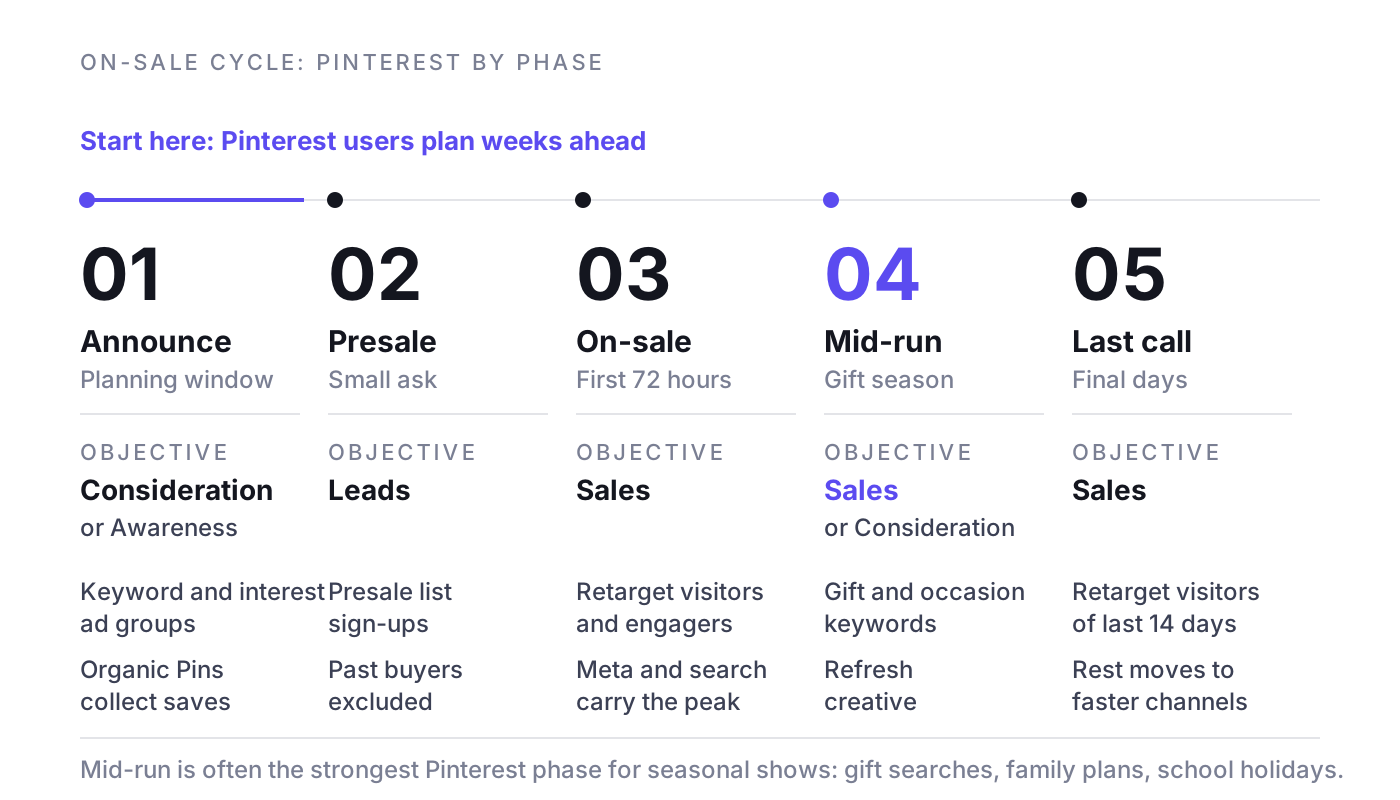
- Announce (planning window): start Pinterest earlier than other channels. For a Christmas show, the planning window opens weeks before most promoters switch on paid social. Run Consideration or Awareness with keyword and interest ad groups, and publish organic Pins at the same time so saves accumulate.
- Presale: a Leads campaign for the presale list works well on Pinterest because the ask is small. Upload past buyers as a customer list and exclude them from prospecting.
- General on-sale, first 72 hours: Pinterest rarely drives the first rush. Keep retargeting of site visitors and Pin engagers running on Sales, and let Meta and search carry the peak. Our article on the on-sale curve in the first 72 hours explains how to read that rush.
- Mid-run: this is often Pinterest's best phase for seasonal shows: gift searches, family planning, school holidays. Add gift and occasion keyword ad groups and refresh creative.
- Last call: keep a small retargeting budget for visitors of the last 14 days. Move the rest to channels that react faster.
Multi-date runs and tours
- One campaign per tour or per run, ad groups by region or city, so you can move budget between dates.
- City keywords matter more than on other channels: "Christmas show Manchester", "musical Hamburg weekend".
- For long runs, separate weekday dates into their own ad group with value-focused creative. See mid-week dates in multi-date runs.
Example campaign names
- PIN_XmasShow26_CONS_Prospecting_KW-Gifts
- PIN_XmasShow26_LEADS_Presale_Actalike-Buyers
- PIN_XmasShow26_SALES_Retargeting_Visitors30d
- PIN_Tour26_SALES_Manchester_KW-City
Targeting: keywords, interests, actalikes and retargeting
Pinterest gives you search-like control that Meta no longer offers. Use it.
🔍 Keyword targeting
Pinterest keyword targeting supports broad match (the default), phrase match, exact match and negative keywords, and Pinterest recommends at least 25 keywords per ad group. For events, build ad groups around plans and occasions rather than only the artist name:
- Gifts: "christmas gift ideas for parents", "experience gifts", "theatre tickets gift".
- Days out: "things to do with kids in december", "family day out [city]".
- Trips: "weekend in [city]", "[city] city break ideas", "hen party ideas [city]".
- Festival life: "festival outfits", "festival packing list", "camping festival tips".
- Genre and show: "nutcracker ballet", "musical [title]", "[artist] concert outfit".
Add negative keywords such as "free", "diy", "printable", "costume" and "coloring page" where they pull irrelevant searches.
Interests
Interest targeting (for example entertainment, music, family, travel, holidays) is useful for reach in the planning window. Combine broad interests with your region rather than stacking narrow interests until the audience is tiny.
Customer lists, actalikes and retargeting
- Customer list: upload past buyers (hashed emails). Pinterest needs at least 100 matches before you can use a list.
- Actalike audiences: Pinterest's version of lookalikes. Seed them from past buyers of similar shows, choose the country and a range. Start with a narrow range, widen when it saturates.
- Site visitors: retarget event page visitors from the tag. Rule of thumb: 30 days in the planning phase, 14 days before the show.
- Engagement audiences: people who saved or clicked your Pins. On Pinterest a save is a planning signal, so this audience is often your warmest.
- Exclusions: exclude buyers of the same show in every prospecting and retargeting ad group.
What to stop doing
- Stop targeting only the artist name. Fans who search for the artist already know; the growth is in occasions.
- Stop judging Pinterest on 7-day results. Its buyers often convert weeks after first contact.
- Stop running broad prospecting without buyer exclusions.
Creatives and formats: Pinterest ad specs for events
Pinterest creative is closer to a magazine than to a feed of shouting ads. Inspiration first, then the ticket. The same principles from creative for live entertainment apply, but the tone is calmer and more aspirational.
Formats and specs
- Standard Pin (image): 2:3, 1000 x 1500 px, JPG or PNG. The workhorse format.
- Video Pin: vertical (2:3 or 9:16) is the safe choice; Pinterest accepts lengths from 4 seconds to 15 minutes. Rule of thumb for events: 6 to 15 seconds, with the show name and date visible without sound.
- Max width video: 1:1 or 16:9, spans the full feed width on mobile. Good for spectacular stage footage.
- Carousel: 2 to 5 cards, 2:3. Ideal for dates and cities, or "the show in five moments".
- Collections: one hero image or video plus at least 3 secondary images (up to 24), shown on mobile. Works for a season programme or a tour with several cities.
What works for live events
- Lead with the experience: the stage, the faces, the moment, not a flat poster.
- Put city and date on the image. Pinterest content lives for a long time, so a Pin without a date gets saved and then disappoints.
- Write titles and descriptions with the keywords people search; they help relevance for both organic and paid.
- Show the occasion: the family in the foyer, the gift envelope, the weekend trip.
- Use a dedicated landing page per show, never the homepage.
Example ad copy
- Title: "Christmas show for the whole family in Manchester, 12 to 28 December" Description: "A gift that is a whole evening. Ballet, live orchestra and snow on stage. Book seats for 12 to 28 December."
- Title: "Musical weekend in Hamburg: plan your trip" Description: "Show on Saturday, harbour on Sunday. Pick your date and seats now, weekend shows go first."
- Title: "Festival packing list plus weekend tickets" Description: "Everything you need for three days in the fields, and the one thing you cannot forget: your ticket."
Budget and bidding for Pinterest ads
Pinterest is an auction, so there is no fixed price for a click or a ticket. What you can control is how much you give the system and what you ask it to optimise for. Pinterest's own Performance+ guidance recommends a budget at least five times your cost-per-acquisition goal and roughly 50 conversion events per week for Leads and Sales campaigns. Performance+ automates bidding, budget and much of the targeting and is available for Consideration, Leads and Sales.
That threshold matters for events. A single show rarely produces 50 Pinterest purchases a week. If you cannot reach it, optimise on a more frequent event (AddToCart or Lead) or use Consideration for prospecting and keep Sales for retargeting.
🧮 Worked example
Example: a family Christmas show, four dates, 2,000 tickets at an average of 49 EUR, so 98,000 EUR gross ticket revenue.
- Total paid media budget: 10,000 EUR, a blended target of 5 EUR per ticket.
- Pinterest test share: 15 percent, so 1,500 EUR.
- Break-even: if each extra ticket leaves 18 EUR contribution after VAT, fees and artist share, any verified cost per ticket below 18 EUR pays for itself.
- Pinterest target: 9 EUR per verified ticket, half of break-even, to leave room for overlap with other channels. At 1,500 EUR that means at least 167 verified tickets.
- Performance+ check: five times a 9 EUR goal is 45 EUR per day, and 50 conversions a week at 9 EUR would be 450 EUR a week. That exceeds this plan, so here you would optimise prospecting on AddToCart and use Sales only for retargeting.
Budget split for the 1,500 EUR, by phase:
- Planning window (12 to 8 weeks before the first date): 35 percent, 525 EUR.
- Presale and on-sale: 20 percent, 300 EUR.
- Gift season mid-run (7 to 2 weeks before): 35 percent, 525 EUR.
- Last call (final 10 days): 10 percent, 150 EUR.
If verified cost per ticket in the planning window is well under target, shift money from the last call into the gift season, not the other way round. For the logic behind each additional euro, read marginal cost per incremental ticket.

Measurement: Pinterest conversions are not ticket sales
Ads Manager reports conversions based on attribution windows for clicks, engagements and views. The conversion insights default is a 30-day click and 1-day view window, and engagements such as saves can count too. That means Pinterest will claim buyers who also saw your Meta ad, searched your name on Google and opened your newsletter. Every platform does this; see marketing attribution for live events.
How to reconcile
- Every week, compare Pinterest-reported purchases with orders in the ticketing system that carry utm_source=pinterest.
- Compare reported value with real ticket revenue, and reported conversions with order_quantity.
- Expect the platform number to be higher than last-click UTM sales. The gap tells you how much Pinterest claims from view and engagement attribution.
- Watch new versus returning buyers: if Pinterest mostly reaches past buyers, it is not adding demand.
🧪 Test incrementality
The honest answer to "does Pinterest sell tickets?" comes from a holdout. For a tour or multi-city run, switch Pinterest on in some regions and off in comparable ones for three to four weeks, then compare ticket sales per region against forecast. For single shows, use a time-based on and off test with care. Our guide to incrementality testing for ticket sales walks through the setup.
Common mistakes and a launch checklist
⚠️ Common mistakes
- Starting Pinterest in the last three weeks, when planners have already decided.
- Using Meta's 4:5 or 1:1 creative unchanged instead of 2:3 Pins.
- Optimising on Checkout with far too few purchases, then concluding Pinterest "does not work".
- Tag and Conversions API both firing without a shared event_id.
- No dates on the creative, so saved Pins drive traffic after the show.
- Reading reported ROAS as truth.
✅ Launch checklist
- Business account, claimed domain, ad account owned by the promoter.
- Pinterest Tag with PageVisit, ViewContent, AddToCart, InitiateCheckout, Checkout (value, currency, order_quantity, order_id, event_id).
- Conversions API live and deduplicated, test orders checked.
- Consent: Pinterest listed in the CMP, no firing before opt-in.
- UTMs on every ad URL, stored on orders in the ticketing system.
- Customer list of past buyers uploaded, at least 100 matches, used as seed and exclusion.
- Keyword ad groups with 25 or more keywords each, plus negatives.
- 2:3 images, vertical video and one carousel per show, with city and date visible.
- Objectives chosen by conversion volume: Consideration or AddToCart for prospecting, Sales for retargeting.
- Weekly reconciliation with ticketing data and a planned holdout test.
Where NYBA fits
NYBA is the Revenue OS for live entertainment. NYBA OS forecasts ticket demand per show, runs campaigns on every channel that sells tickets (Meta, Google, TikTok and other paid channels), shifts budget toward the shows that need it and measures everything against verified ticket sales from the ticketing system rather than platform-reported purchases. It has worked on 75M+ tickets and runs across 1,200+ events per year for 100+ promoters, with clients such as Live Nation, Cirque du Soleil and BBC Earth.
For a channel like Pinterest, this means a simple question gets a clear answer: did this channel sell tickets that would not have sold otherwise, and should the next euro go here or somewhere else?
Frequently asked questions
Are Pinterest ads worth it for selling event tickets?
For planned purchases, often yes: Christmas shows, musicals, family entertainment, attractions, festivals and trips to events. For last-minute, nightlife or very young audiences, usually less. Test with a defined budget and judge on verified ticket sales.
How much do Pinterest ads cost?
There is no fixed price; costs come from an auction and depend on audience, season and creative. Pinterest's Performance+ guidance recommends a budget of at least five times your cost-per-acquisition goal. Calculate your break-even cost per ticket first, then set the test budget.
How do I create a Pinterest ad for an event?
Set up a business account and the Pinterest Tag, choose an objective in Ads Manager, create an ad group with location, keywords and audiences, upload 2:3 Pins or vertical videos with date and city, link to the show page with UTMs, then launch and review weekly.
Which campaign objective should I use for ticket sales?
Sales if you have enough purchases to optimise on. With low volume, use Consideration or optimise on AddToCart for prospecting, Leads for presale registration, and Sales for retargeting warm audiences.
Can I track ticket sales if my shop runs on a ticketing platform?
Yes, with limits. Use the platform's Pinterest integration if available, send verified orders through the Conversions API, or use your own landing page with the tag and reconcile sales via UTMs in the ticketing data.
How early should I start Pinterest ads for a Christmas show?
Earlier than on Meta or TikTok. As a rule of thumb, have Pins and campaigns live around 8 to 12 weeks before the first date, so you catch people while they plan, save ideas and look for gifts.
Pinterest ads or Facebook ads for events?
Both do different jobs. Meta usually carries volume and urgency; Pinterest adds early, planning-driven demand for suitable shows. Run Pinterest as a tested addition and compare verified cost per ticket.
Want to see which channels actually sell tickets for your shows, Pinterest included? Book a demo. One event, clean numbers, then you decide.
Related reading: TikTok ads for events, festival marketing strategy, demand forecasting for live events, ticket sales KPIs


What would 3x more
revenue mean for you?
Find out:
