


Event Marketing Software: What Promoters Should Actually Look For
An honest buyer's guide to event marketing software: the five tool categories, what each solves and does not, a seven-point checklist, demo questions, red flags and a pilot plan you can run on one event using your own ticketing data.


Most event marketing software looks convincing in a demo, and usually for the same reason: the dashboard is full of conversions. The question a promoter actually needs answered is both simpler and harder. Did this tool help you sell tickets that would not have sold anyway, and can you prove it from your own ticketing data? This is a buyer's guide written for promoters, tour producers, venues, theatres and festivals. It sorts the market into categories, is honest about what each one solves and what it does not, and gives you a checklist, demo questions, red flags and a pilot plan you can use with any vendor.
One thing up front: not everyone needs a big stack. A single small venue with a loyal local audience can often run perfectly well on a ticketing system plus a good email tool. The rest of this article helps you figure out where you sit and what is worth paying for.
Key takeaways
- Event marketing software falls into five categories: ticketing platforms, email and CRM, ad management and creative tools, analytics and attribution, and revenue platforms.
- Match the stack to the problem: a single small venue with little paid media usually needs only ticketing plus email.
- Score every tool from 0 to 2 on seven criteria, above all its connection to ticketing data and whether it measures verified ticket sales.
- Treat these as red flags: ROAS without a source, reported purchases above actual orders, no raw data export and long lock-in before any proof.
- Run a pilot on one event with a fixed budget and a baseline, and judge it on cost per incremental ticket from your ticketing export.
The five categories of event marketing software
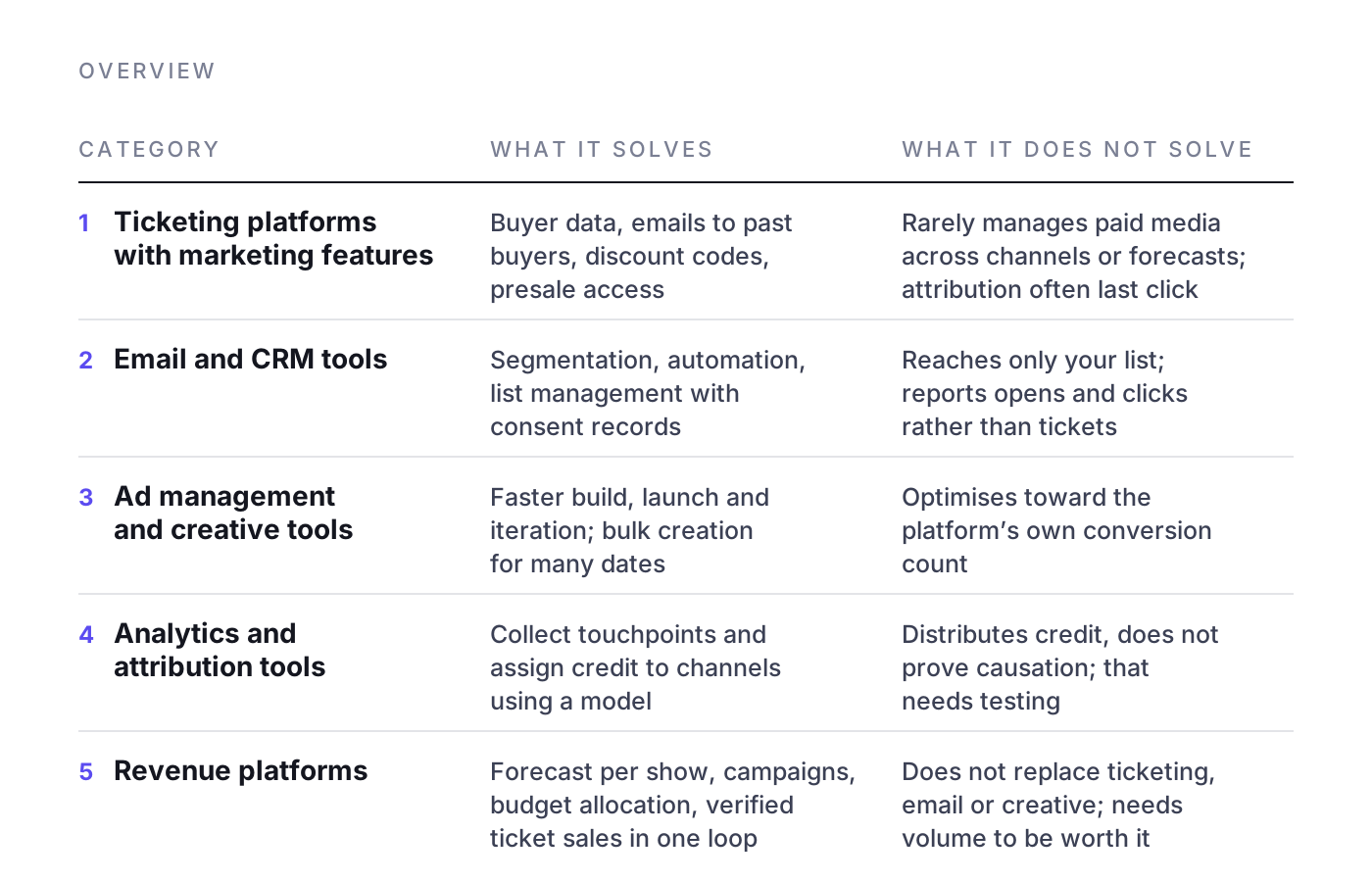
The label covers very different products. Compare categories before you compare vendors; most stacks combine two or three.
1. Ticketing platforms with built-in marketing features
What it solves: Your ticketing system already holds the most valuable data you have: who bought, when, at what price, for which show. Many platforms add marketing features on top, such as email campaigns to past buyers, discount codes, presale access, simple tracking links and basic pixel integrations.
What it does not solve: These features are usually built for one event at a time and stay within the platform's own ecosystem. They rarely manage paid media budgets across channels, rarely forecast demand, and the attribution they show is often limited to "which link did the buyer click last".
2. Email and CRM tools
What it solves: Email remains one of the cheapest channels for selling tickets to people who already know you. A proper email or CRM tool gives you segmentation (past buyers of a genre, lapsed buyers, presale sign-ups), automation (reminder sequences, abandoned checkout flows where your ticketing system allows it) and clean list management with consent records.
What it does not solve: Email only reaches people already on your list. It does not find new audiences, it does not tell you how much paid budget a show needs, and email platforms tend to report opens and clicks rather than tickets. Without a connection to ticketing data, "revenue from email" is often an estimate.
3. Ad management and creative tools
What it solves: These tools make it faster to build, launch and iterate on campaigns on Meta, Google, TikTok and other paid channels. Good ones handle bulk creation for many dates, creative versions per city and automated rules.
What it does not solve: Speed is not the same as judgement. Ad tools optimise towards the signal the ad platform gives them, which is the platform's own conversion count. If that count is inflated or duplicated across channels, the tool optimises efficiently towards the wrong number. They also rarely know which of your shows actually needs help this week. For more on what makes the creative itself work, see creative for live entertainment.
4. Analytics and attribution tools
What it solves: Analytics and attribution tools try to answer "which channel sold the ticket". They collect touchpoints and assign credit to channels using a model.
What it does not solve: Attribution models distribute credit; they do not prove causation. Several platforms will happily claim the same ticket, and a model that splits credit neatly still cannot tell you whether the ticket would have sold without the ad. That question needs testing. The article on marketing attribution for live events explains why platforms claim the same sale, and incrementality testing for ticket sales shows how to measure what the campaign actually caused.
5. Revenue platforms
What it solves: A revenue platform connects the pieces the other categories leave separate: a demand forecast per show, campaigns across paid channels, budget allocation between shows, and measurement against verified ticket sales from the ticketing system. The point is a single decision loop: which shows need help, how much, on which channel, and did it work.
What it does not solve: A revenue platform does not replace your ticketing system, your email tool or good creative. It also needs volume to be worth the setup: enough shows, enough budget and enough data for forecasting and budget shifting to matter. For a single small event, it is usually more than you need.
How much event marketing platform do you actually need?
Match the stack to the problem, not to the demo. As a rule of thumb:
- Single small venue, mostly local audience, little paid media: ticketing plus email is usually enough. Put your effort into list growth, a clear announce and on-sale rhythm and good reminders.
- Venue or promoter with regular paid campaigns: add proper tracking from ticketing into the ad platforms (server-side events, clean purchase data) and a simple weekly report that compares spend to tickets sold.
- Multi-date runs, tours, festivals, several cities: this is where budget shifting between shows, forecasting and cross-channel measurement start to pay for themselves, because the cost of putting money behind the wrong show grows with every date.
The evaluation checklist for event promotion software
Use these seven criteria for any tool in any category. Score each one from 0 (missing) to 2 (strong) and write down the evidence the vendor showed you, not what they said.
- Connection to ticketing data. Does the tool read actual orders from your ticketing system (via API, regular export or server-side integration), or does it rely only on browser pixels? Ask which systems are supported today, not on the roadmap. Background: why a ticketing-first data layer matters.
- Measures verified ticket sales, not platform conversions. The number on the main report should reconcile with the number in your ticketing system. If the tool reports 400 purchases and your box office shows 250 orders for the same period and channel mix, you need to know why.
- Multi-show and tour budgeting. Can you see all shows side by side, set budgets per show and per channel, and move money from a show that is selling well to one that is behind? Tools built around single campaigns tend to optimise each one in isolation.
- Forecasting. Does the tool estimate where each show will land, early enough for you to act? Ask how the forecast is built and ask to see it backtested on your past shows. See demand forecasting for live events for what a useful forecast looks like.
- Data ownership and GDPR. Who owns the customer and order data? Can you export everything in a usable format at any time? Where is data stored and processed, is there a data processing agreement, which sub-processors are involved, and how is consent handled for tracking and email? Involve your data protection officer before signing, not after.
- Setup effort. How many weeks until the first useful report, what does your team have to do, and who maintains integrations when a ticketing system or ad platform changes its API?
- Pricing model and incentives. A fee as a percentage of ad spend rewards spending more. A per-ticket fee rewards attributing more tickets to the tool. A flat subscription is neutral on spend but says nothing about results. None of these is wrong, but you should know which way the incentive points.
Questions to ask any vendor in a demo
Demos are designed to show the best case. These questions bring the conversation back to your situation.
- "Show me a report where your numbers are reconciled against the ticketing system's order data. Where do they differ, and why?"
- "If Meta, Google and TikTok each claim the same ticket, how does your tool count it?"
- "How do you separate tickets the campaign caused from tickets that would have sold anyway?"
- "Take two of our shows: one selling well, one behind. What would your tool tell us to do with the budget this week?"
- "How accurate was your forecast on shows similar to ours, and how do you measure that accuracy?"
- "If we leave after a year, what data do we take with us, and in what format?"
- "What does your pricing look like if we spend half as much on ads next season?"
Vague answers to the first three questions are the most informative signal you will get.
Red flags in ticket marketing software
- ROAS figures without a source. A return on ad spend number that comes from ad platform conversions, not from ticketing data, tells you what the platform claims, not what you earned. The guide on ROAS for ticket sales explains how to calculate it properly.
- Reported purchases that exceed actual orders. If the sum of channel-reported tickets is higher than what you sold, the tool is counting the same buyers more than once.
- No way to export raw data. If you cannot get your data out, you do not control it.
- Case studies with no baseline. "Sold out in two weeks" means little without knowing how the show was expected to sell without the tool.
- Long lock-in before any proof. A vendor confident in its results should be willing to prove them on a single event first.
How to run a fair pilot on one event
A pilot is only useful if it can fail. Set it up so that the result is decided by your ticketing data, not by the vendor's dashboard.
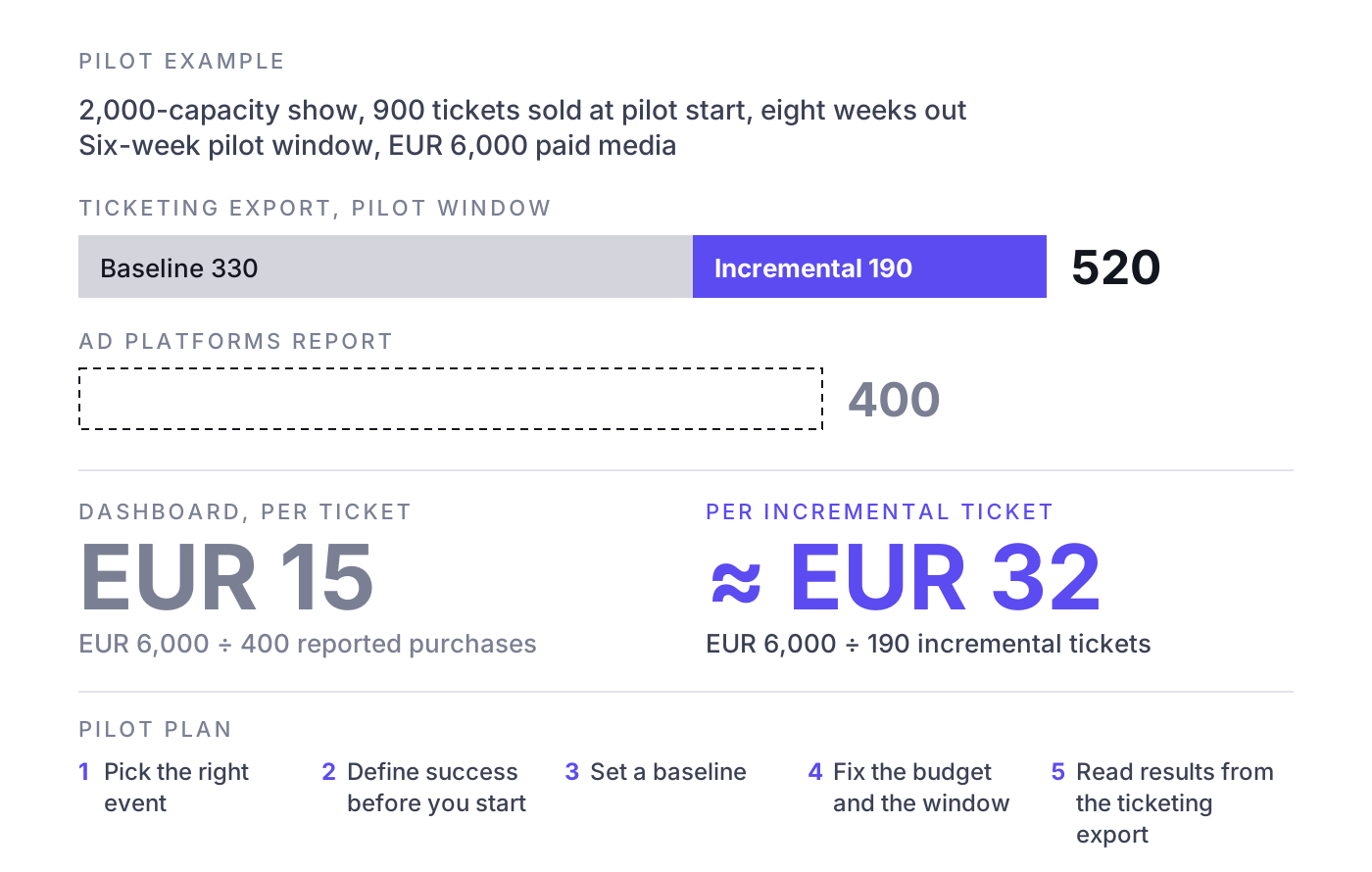
- Pick the right event. Choose a show with enough runway (as a rule of thumb, at least six to eight weeks until the date) and enough inventory left that a difference is measurable. Avoid a show that will sell out regardless; it proves nothing.
- Define success before you start. Agree on one primary metric, for example verified tickets sold in the pilot window and cost per incremental ticket. Put it in writing with the vendor.
- Set a baseline. Use a comparable past show, the current sales pace projected forward, or a holdout (a region or audience segment that gets no campaign). The marginal cost per incremental ticket article shows how to calculate the comparison.
- Fix the budget and the window. Same budget you would have spent otherwise, fixed start and end dates. Changing either mid-pilot makes the result impossible to read.
- Read results from the ticketing export. At the end, pull orders from your ticketing system for the window and compare against the baseline. Use the vendor's dashboard as a second opinion, not the verdict.
Example: A 2,000-capacity show has 900 tickets sold when the pilot starts, eight weeks out. Based on the current pace, you project 330 additional sales in the six-week pilot window without extra campaigns. The pilot spends EUR 6,000 in paid media. The ad platforms report 400 purchases, which would suggest a cost of EUR 15 per ticket. Your ticketing export shows 520 tickets sold in the window. Incremental tickets: 520 minus 330 = 190. Cost per incremental ticket: EUR 6,000 divided by 190 = roughly EUR 32. That is the number to compare across vendors and against your average ticket margin, not the EUR 15 on the dashboard.
If the pilot cannot produce this calculation, the setup was wrong or the tool cannot reach your ticketing data. For the full business case, see how to calculate event ROI.
Where NYBA fits
NYBA sits in the fifth category: a revenue platform, or as we call it, a Revenue OS for live entertainment. NYBA OS forecasts ticket demand per show, runs campaigns on the channels that sell tickets (Meta, Google, TikTok and other paid channels), shifts budget towards the shows that need it and measures everything against verified ticket sales from the ticketing system rather than platform-reported purchases. On top of the platform sits an expert layer, not a replacement for it. NYBA is used for more than 1,200 events per year by over 100 promoters, including Live Nation, Cirque du Soleil and BBC Earth, with more than 75 million tickets in the data.
What NYBA is not: it is not a ticketing system, not an email tool, and not the right choice for every setup. If you run a single small venue with little paid media, a ticketing system and a good email tool will likely serve you better for the money. NYBA makes the most sense when you run many shows, tours or multi-date runs with meaningful paid budgets, where deciding which show gets the next euro is the hard part.
Frequently asked questions
What is event marketing software?
An umbrella term for tools that help sell event tickets: ticketing platforms with marketing features, email and CRM tools, ad management and creative tools, analytics and attribution tools, and revenue platforms that connect forecasting, campaigns and ticket data.
Do I need an event marketing platform if I already have a ticketing system?
Not necessarily. For a single venue with a local audience and little paid media, ticketing plus email often covers it. Additional software pays off when you run many shows or significant paid campaigns and need to decide where budget goes.
How do I compare tools that report different results?
Reconcile every tool against the same source: verified orders from your ticketing system. Whichever tool's numbers match that source most closely, and can explain the difference, is the one to trust.
What should I check for GDPR?
Data ownership, full export, where data is stored and processed, the data processing agreement, the list of sub-processors and how consent for tracking and email is collected. Have your data protection officer review it before signing.
Which pricing model is best for marketing tools for promoters?
There is no single best model. Know the incentive behind each: percentage of spend rewards higher spend, per-ticket fees reward claiming more tickets, flat fees are neutral on both. Choose the one whose incentive you can live with.
If you want to see how your shows would look with forecasting, budget shifting and measurement against verified ticket sales, book a demo. One event, clean numbers, then you decide.
Related reading: The event marketing guide, Ticket sales analytics and KPIs, Event marketing agency vs revenue platform, How to sell more tickets

Was würde 3x mehr
Umsatz für dich bedeuten?
Finde es heraus:
